
Work on your documents even without an internet connection thanks to offline mode

Collaborative tools are now central to your daily work life: shared documents, workspaces, team chat… everything now happens in the digital workplace.

But most of these solutions rely on one implicit condition: being constantly connected.

Banner_sneak peek_offline

Content

Even though internet access has become much more widespread in recent years, there are still many situations where the connection can be unstable or unsecure: when traveling, on the train, at a client’s office, when working remotely, or in a café.

In these contexts, accessing documents can quickly become a brake to productivity.

It is precisely to address these use cases that eXo has integrated a new feature into its 7.1 version: offline mode, which allows you to continue working on your documents even without a connection.

📵Managing situations without a connection

Hybrid working and mobility have deeply changed working habits.

Today, employees work just as often from a fixed workstation connected to the organization’s network as they do from their laptop while traveling or from their mobile phone. They view and edit documents from different devices and in a variety of contexts.

However, in many tools, documents are only accessible online, which complicates many tasks:

  • preparing for a meeting while traveling by train or plane
  • editing an important document while on the go
  • working in an area with an unstable or unsecure connection
  • quickly accessing a file while on the move

In these situations, workarounds are often adopted: downloading files in advance, sending files by email, or storing copies on computer.

These practices cause several problems:

  • multiple versions of the same document
  • loss of visibility for teams who no longer know which version is up to date
  • tedious manual synchronization

Offline mode addresses these issues by keeping documents on the collaborative platform, even when no connection is available.

📴Access your documents offline with eXo 7.1

Version 7.1 of eXo Platform allows you to access some documents even when you don’t have an internet connection.

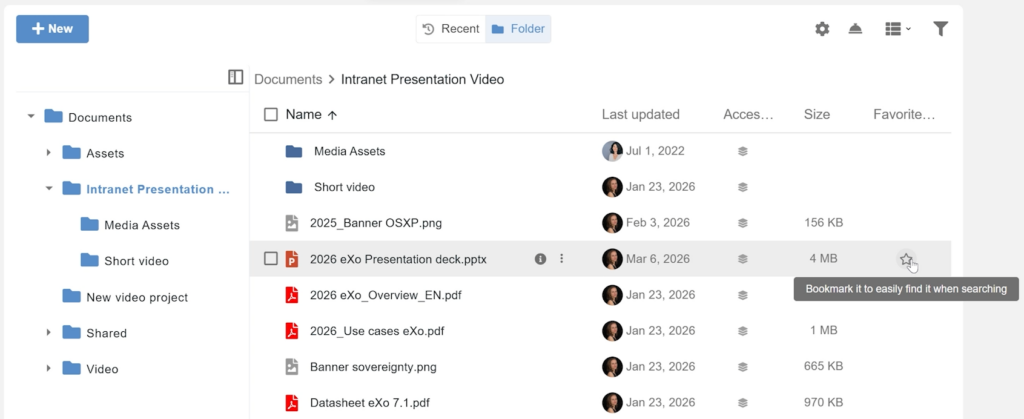
Files added to your favorites become accessible offline from the platform, even when your device is no longer connected. This allows you to open, view, and edit these documents locally.

Once the connection is restored, edited documents can be manually synchronized with the platform.

This feature is available via the eXo Platform Progressive Web App (PWA) and does not require the installation of an additional client.

This allows you to find your essential documents and continue working regardless of your mobility context.

🔎How does it work?

Here’s how to use offline mode in eXo Platform.

1. Install the PWA application and enable offline access

To use offline mode, start by installing the eXo Platform PWA application.

Go to your settings and click on “Install application.”

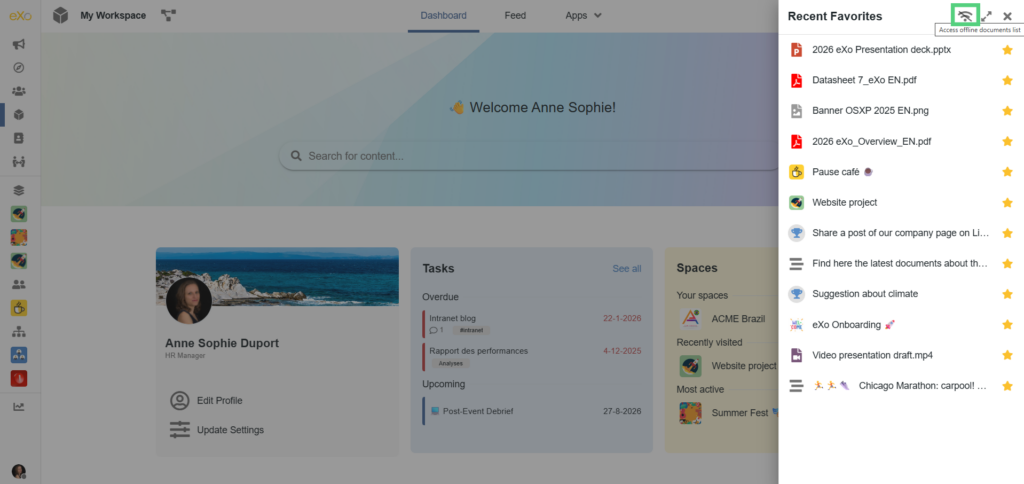
Then enable the “Offline access to favorite documents” option to allow you to download the files you want to view without an internet connection.

2. Add documents to favorites

To make a document accessible offline, simply add it to your favorites on the platform using the star icon.

The document is then automatically downloaded to the PWA application so that it can be accessed even without a connection.

3. Access and edit your documents offline

When your device is no longer connected to the internet, documents added to your favorites remain accessible from the PWA application.

You can then open these files to:

  • View them
  • Or edit them

4. Synchronize your new versions

Once the connection is restored, a red dot will appear on the offline mode icon to indicate that documents have been edited.

Clicking on it will display the list of documents, and those that have been edited will be identified by a red dot.

You can then upload the latest version of these documents to the platform.

The documents are then updated for all users.

🕶️A digital workplace adapted to new uses

In everyday work life, uses are becoming increasingly mobile.

Being able to access information and documents without constantly relying on an internet connection helps make collaborative tools more flexible and reliable.

With the offline mode available in eXo Platform 7.1, the digital workplace provides a smoother user experience and adapts to new ways of working, allowing you to remain productive even without a connection.

FREE DATASHEET

eXo Platform 7  : The Open-Source

Digital Workplace Platform

Download the eXo Platform 7 Datasheet and discover all the features and benefits

book-datasheet-7
cta-rectangle-rose
FREE DATASHEET

Download the eXo Platform Datasheet and discover all the features and benefits

5/5 - (1 vote)
I am the communication manager at eXo Platform. I found myself in communications a bit by chance, but this field brings together everything that pationates me: creativity, energy, meetings, collaborative work, sharing and exchanges of good practices. I need to give meaning to what I do and put people at the center of all my actions.
Related posts
  • All
  • eXo
  • Digital workplace
  • Employee engagement
  • Open source
  • Future of work
  • Internal communication
  • Collaboration
  • News
  • intranet
  • workplace
  • Knowledge management
  • Employee experience
  • Employee productivity
  • onboarding
  • Employee recognition
  • Change management
  • Cartoon
  • Digital transformation
  • Infographic
  • Remote work
  • Industry trends
  • Product News
  • Thought leadership
  • Tips & Tricks
  • Tutorial
  • Uncategorized
Leave a Reply

( Your e-mail address will not be published)

guest
0 Comments
Commentaires en ligne
Afficher tous les commentaires