Tutorial: How to extend the eXo Platform notification system
In the last tutorial, we walked through simple steps to create a gadget using an Ajax DOM Object to consume the eXo API. However, you saw those steps outside the eXo Platform. I’m sure you are eager to go deeper inside its working mechanism. The first topic I want to focus on is the eXo notification system. Yes, I said the first— we will focus on another topic in an upcoming tutorial. Let’s get started!
The eXo Platform provides a notification system that you can extend using two mechanisms:
- the channels of notification, such as email, directly online, through pushing, etc.; and
- the types of notifications, such as connection invitations, space activities, etc.
This guide will show you how to use both of these mechanisms by:
- creating a new notification channel to push notification information to the console panel; and
- creating a new notification type to indicate when a user in your network changes his or her profile.
You can use the steps below to create a complete extension with these features.
1. Create a new Maven project as shown below:
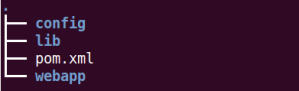
2. Add the following dependencies to the
<?xml version="1.0" encoding="UTF-8"?>
<project xmlns="https://maven.apache.org/POM/4.0.0" xmlns:xsi="https://www.w3.org/2001/XMLSchemainstance"
xsi:schemaLocation="https://maven.apache.org/POM/4.0.0 https://maven.apache.org/xsd/maven-4.0.0.xsd">
    <modelVersion>4.0.0</modelVersion>
    <groupId>com.acme.samples</groupId>
    <artifactId>console-notification</artifactId>
    <version>1.0.0</version>
    <packaging>pom</packaging>
    <modules>
        <module>lib</module>
        <module>config</module>
        <module>webapp</module>
    </modules>
    <properties>
        <org.exoplatform.depmgt.version>10-SNAPSHOT</org.exoplatform.depmgt.version>
        <org.exoplatform.kernel.version>2.4.9-GA</org.exoplatform.kernel.version>
        <org.exoplatform.core.version>2.5.9-GA</org.exoplatform.core.version>
        <!-- GateIn Project Dependencies -->
        <org.gatein.portal.version>3.5.10.Final</org.gatein.portal.version>
        <!-- Platform Project Dependencies -->
        <org.exoplatform.social.version>4.2.x-SNAPSHOT</org.exoplatform.social.version>
    </properties>
    <dependencyManagement>
        <dependencies>
            <!-- Import versions from platform project -->
            <dependency>
                <groupId>org.exoplatform</groupId>
                <artifactId>maven-depmgt-pom</artifactId>
                <version>${org.exoplatform.depmgt.version}</version>
                <type>pom</type>
                <scope>import</scope>
            </dependency>
            <dependency>
                <groupId>org.exoplatform.social</groupId>
                <artifactId>social</artifactId>
                <version>${org.exoplatform.social.version}</version>
                <type>pom</type>
                <scope>import</scope>
            </dependency>
            <!-- Our own project modules -->
            <dependency>
                <groupId>org.exoplatform.social</groupId>
                <artifactId>social-notification-addon-webapp</artifactId>
                <version>${project.version}</version>
            </dependency>
            <dependency>
                <groupId>org.exoplatform.social</groupId>
                <artifactId>social-notification-addon-lib</artifactId>
                <version>${project.version}</version>
            </dependency>
            <!-- To be replaced by an import of GateIn Portal parent POM -->
            <dependency>
                <groupId>org.gatein.portal</groupId>
                <artifactId>exo.portal.component.portal</artifactId>
                <version>${org.gatein.portal.version}</version>
            </dependency>
        </dependencies>
    </dependencyManagement>
</project>
3. Create a file and two files inside the config folder as shown below:
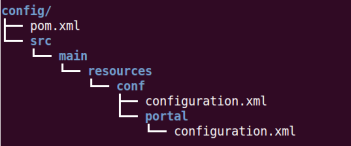
4. Add the following information to :
<?xml version="1.0" encoding="UTF-8"?>
<project xmlns="https://maven.apache.org/POM/4.0.0" xmlns:xsi="https://www.w3.org/2001/XMLSchemainstance"
xsi:schemaLocation="https://maven.apache.org/POM/4.0.0 https://maven.apache.org/maven-v4_0_0.xsd">
    <modelVersion>4.0.0</modelVersion>
    <parent>
        <groupId>com.acme.samples</groupId>
        <artifactId>console-notification</artifactId>
        <version>1.0.0</version>
    </parent>
    <artifactId>console-notification-config</artifactId>
    <packaging>jar</packaging>
    <build>
        <finalName>console-notification-config</finalName>
    </build>
</project>
5. Add the configurations below to :
<?xml version="1.0" encoding="UTF-8"?>
<configuration
xmlns:xsi="https://www.w3.org/2001/XMLSchema-instance"
xsi:schemaLocation="https://www.exoplatform.org/xml/ns/kernel_1_2.xsd https://www.exoplatform.org/xml/ns/kernel_1_2.xsd"
xmlns="https://www.exoplatform.org/xml/ns/kernel_1_2.xsd">
    <external-component-plugins>
        <!-- The full qualified name of the PortalContainerConfig -->
        <target-component>org.exoplatform.container.definition.PortalContainerConfig</target-component>
        <component-plugin>
            <!-- The name of the plugin -->
            <name>Add PortalContainer Definitions</name>
            <!-- The name of the method to call on the PortalContainerConfig in order to register the PortalContainerDefinitions -->
            <set-method>registerChangePlugin</set-method>
            <!-- The full qualified name of the PortalContainerDefinitionPlugin -->
            <type>org.exoplatform.container.definition.PortalContainerDefinitionChangePlugin</type>
            <priority>102</priority>
            <init-params>
                <values-param>
                    <name>apply.specific</name>
                    <value>portal</value>
                </values-param>
                <object-param>
                    <name>addDependencies</name>
                    <object type="org.exoplatform.container.definition.PortalContainerDefinitionChange$AddDependencies">
                        <!-- The name of the portal container -->
                        <field name="dependencies">
                            <collection type="java.util.ArrayList">
                                <value>
                                    <string>console-notification-webapp</string>
                                </value>
                            </collection>
                        </field>
                    </object>
                </object-param>
            </init-params>
        </component-plugin>
    </external-component-plugins>
</configuration>
6. Add the following configurations to :
<?xml version="1.0" encoding="UTF-8"?>
<configuration xmlns:xsi="https://www.w3.org/2001/XMLSchema-instance"
xsi:schemaLocation="https://www.exoplatform.org/xml/ns/kernel_1_2.xsd https://www.exoplatform.org/xml/ns/kernel_1_2.xsd"
xmlns="https://www.exoplatform.org/xml/ns/kernel_1_2.xsd">
    <!-- register new event listener -->
    <external-component-plugins>
        <target-component>org.exoplatform.social.core.manager.IdentityManager</target-component>
        <component-plugin>
            <name>SocialProfileListener</name>
            <set-method>registerProfileListener</set-method>
            <type>com.acme.samples.notification.SocialProfileListener</type>
        </component-plugin>
    </external-component-plugins>
    <!-- register new channel -->
    <external-component-plugins>
        <target-component>org.exoplatform.commons.api.notification.channel.ChannelManager</target-component>
        <component-plugin profiles="all">
            <name>console.channel</name>
            <set-method>register</set-method>
            <type>com.acme.samples.notification.ConsoleChannel</type>
            <description>Register the console channel to manager.</description>
        </component-plugin>
    </external-component-plugins>
    <!-- register new notification type -->
    <external-component-plugins>
        <target-component>org.exoplatform.commons.api.notification.service.setting.PluginContainer</target-component>
        <component-plugin>
            <name>notification.plugins</name>
            <set-method>addPlugin</set-method>
            <type>com.acme.samples.notification.plugin.UpdateProfilePlugin</type>
            <description>Initial information for plugin.</description>
            <init-params>
                <object-param>
                    <name>template.UpdateProfilePlugin</name>
                    <description>The template of UpdateProfilePlugin</description>
                    <object
                    type="org.exoplatform.commons.api.notification.plugin.config.PluginConfig">
                        <field name="pluginId">
                            <string>UpdateProfilePlugin</string>
                        </field>
                        <field name="resourceBundleKey">
                            <string>UINotification.label.UpdateProfilePlugin</string>
                        </field>
                        <field name="order">
                            <string>11</string>
                        </field>
                        <field name="defaultConfig">
                            <collection type="java.util.ArrayList">
                                <value>
                                    <string>Instantly</string>
                                </value>
                            </collection>
                        </field>
                        <field name="groupId">
                            <string>general</string>
                        </field>
                        <field name="bundlePath">
                            <string>locale.notification.template.Notification</string>
                        </field>
                    </object>
                </object-param>
            </init-params>
        </component-plugin>
    </external-component-plugins>
</configuration>
This file does the following:
- Registers as a profile event listener plugin with the component. This plugin listens to user profile updating events.
- Registers the new plugin with the component. This plugin pushes notifications to the console panel.
- Registers the new with the component. This plugin declares and initializes parameters for the new notification type. The initial parameters include the following:
– —the template for
– —the ID of the plugin defined in the class
– —the key that will be provided in the resource bundle files for each locale
– —the order in which the new type will be displayed in the notification group
– —the ID of the group this notification type belongs to
– —the path to the local resource
– —the default settings for this notification type at start up
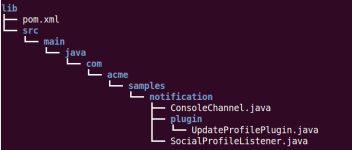
7. Create another project under the folder with the file as shown below:
<?xml version="1.0" encoding="UTF-8"?>
<project xmlns="https://maven.apache.org/POM/4.0.0" xmlns:xsi="https://www.w3.org/2001/XMLSchemainstance"
xsi:schemaLocation="https://maven.apache.org/POM/4.0.0 https://maven.apache.org/maven-v4_0_0.xsd">
    <modelVersion>4.0.0</modelVersion>
    <parent>
        <groupId>com.acme.samples</groupId>
        <artifactId>console-notification</artifactId>
        <version>1.0.0</version>
    </parent>
    <artifactId>console-notification-lib</artifactId>
    <packaging>jar</packaging>
    <dependencies>
        <dependency>
            <groupId>log4j</groupId>
            <artifactId>log4j</artifactId>
            <scope>provided</scope>
        </dependency>
        <dependency>
            <groupId>org.exoplatform.social</groupId>
            <artifactId>social-component-core</artifactId>
            <scope>provided</scope>
        </dependency>
        <dependency>
            <groupId>org.exoplatform.core</groupId>
            <artifactId>exo.core.component.organization.api</artifactId>
            <scope>provided</scope>
        </dependency>
        <dependency>
            <groupId>org.exoplatform.social</groupId>
            <artifactId>social-component-common</artifactId>
            <scope>provided</scope>
        </dependency>
    </dependencies>
    <build>
        <finalName>console-notification-lib</finalName>
    </build>
</project>
8. Implement the class as follows:
package com.acme.samples.notification.plugin;
import java.util.ArrayList;
import java.util.HashSet;
import java.util.Set;
import org.exoplatform.commons.api.notification.NotificationContext;
import org.exoplatform.commons.api.notification.model.ArgumentLiteral;
import org.exoplatform.commons.api.notification.model.NotificationInfo;
import org.exoplatform.commons.api.notification.plugin.BaseNotificationPlugin;
import org.exoplatform.commons.utils.CommonsUtils;
import org.exoplatform.commons.utils.ListAccess;
import org.exoplatform.container.xml.InitParams;
import org.exoplatform.services.log.ExoLogger;
import org.exoplatform.services.log.Log;
import org.exoplatform.social.core.identity.model.Identity;
import org.exoplatform.social.core.identity.model.Profile;
import org.exoplatform.social.core.manager.RelationshipManager;
//This class extends BaseNotificationPlugin to push new notification type of profile updating event
public class UpdateProfilePlugin extends BaseNotificationPlugin {
    public final static ArgumentLiteral<Profile> PROFILE = new ArgumentLiteral<Profile>(Profile.class, "profile");
    private static final Log LOG = ExoLogger.getLogger(UpdateProfilePlugin.class);
    public final static String ID = "UpdateProfilePlugin";
    public UpdateProfilePlugin(InitParams initParams) {
        super(initParams);
    }
    @Override
    public String getId() {
        return ID;
    }
    @Override
    public boolean isValid(NotificationContext ctx) {
        return true;
    }
    @Override
    protected NotificationInfo makeNotification(NotificationContext ctx) {
        Profile profile = ctx.value(PROFILE);
        Set<String> receivers = new HashSet<String>();
        RelationshipManager relationshipManager = CommonsUtils.getService(RelationshipManager.class);
        Identity updatedIdentity = profile.getIdentity();
        ListAccess<Identity> listAccess = relationshipManager.getConnections(updatedIdentity);
        try {
            Identity[] relationships = relationshipManager.getConnections(updatedIdentity).load(0, listAccess.getSize());
            for(Identity i : relationships) {
                receivers.add(i.getRemoteId());
            }
            } catch (Exception ex) {
            LOG.error(ex.getMessage(), ex);
        }
        return NotificationInfo.instance()
        .setFrom(updatedIdentity.getRemoteId())
        .to(new ArrayList<String>(receivers))
        .setTitle(updatedIdentity.getProfile().getFullName() + " updated his/her profile.<br/>")
        .key(getId());
    }
}
- This class extends the , which retrieves information from the new notification type for the user profile updating event.
- The method was overridden to generate essential information for a notification.
9. Implement the class as shown below:
package com.acme.samples.notification;
import org.exoplatform.commons.api.notification.NotificationContext;
import org.exoplatform.commons.api.notification.model.PluginKey;
import org.exoplatform.commons.notification.impl.NotificationContextImpl;
import org.exoplatform.social.core.identity.model.Profile;
import org.exoplatform.social.core.profile.ProfileLifeCycleEvent;
import org.exoplatform.social.core.profile.ProfileListenerPlugin;
import com.acme.samples.notification.plugin.UpdateProfilePlugin;
/* This class extends ProfileListenerPlugin to trigger avatar/experience updating events and plug them into UpdateProfilePlugin as notifications */
public class SocialProfileListener extends ProfileListenerPlugin {
    @Override
    public void avatarUpdated(ProfileLifeCycleEvent event) {
        Profile profile = event.getProfile();
        NotificationContext ctx = NotificationContextImpl.cloneInstance().append(UpdateProfilePlugin.PROFILE, profile);
        ctx.getNotificationExecutor().with(ctx.makeCommand(PluginKey.key(UpdateProfilePlugin.ID))).execute(ctx);
    }
    @Override
    public void experienceSectionUpdated(ProfileLifeCycleEvent event) {
        Profile profile = event.getProfile();
        NotificationContext ctx = NotificationContextImpl.cloneInstance().append(UpdateProfilePlugin.PROFILE, profile);
        ctx.getNotificationExecutor().with(ctx.makeCommand(PluginKey.key(UpdateProfilePlugin.ID))).execute(ctx);
    }
    //Abstract classes must be overridden
    @Override
    public void contactSectionUpdated(ProfileLifeCycleEvent event) {
        Profile profile = event.getProfile();
        NotificationContext ctx = NotificationContextImpl.cloneInstance().append(UpdateProfilePlugin.PROFILE, profile);
        ctx.getNotificationExecutor().with(ctx.makeCommand(PluginKey.key(UpdateProfilePlugin.ID))).execute(ctx);
    }
    @Override
    public void createProfile(ProfileLifeCycleEvent event) {
        Profile profile = event.getProfile();
        NotificationContext ctx = NotificationContextImpl.cloneInstance().append(UpdateProfilePlugin.PROFILE, profile);
        ctx.getNotificationExecutor().with(ctx.makeCommand(PluginKey.key(UpdateProfilePlugin.ID))).execute(ctx);
    }
}
This class extends the ProfileListenerPlugin to trigger user profile updating events and plug them into UpdateProfilePlugin as notifications. An instance of UpdateProfilePlugin will be used to generate and send messages to all notification channels.
– —trigger an avatar updating event
– —trigger a user experience updating event
– —trigger a user contact information updating event
– —trigger a user profile creating event
10. Implement the class to obtain the following code:
package com.acme.samples.notification;
import java.io.Writer;
import org.exoplatform.commons.api.notification.NotificationContext;
import org.exoplatform.commons.api.notification.channel.AbstractChannel;
import org.exoplatform.commons.api.notification.channel.template.AbstractTemplateBuilder;
import org.exoplatform.commons.api.notification.channel.template.TemplateProvider;
import org.exoplatform.commons.api.notification.model.ChannelKey;
import org.exoplatform.commons.api.notification.model.MessageInfo;
import org.exoplatform.commons.api.notification.model.NotificationInfo;
import org.exoplatform.commons.api.notification.model.PluginKey;
import org.exoplatform.commons.notification.lifecycle.SimpleLifecycle;
import org.exoplatform.services.log.ExoLogger;
import org.exoplatform.services.log.Log;
//This class extends AbstractChannel to define a new notification channel which sends messages through console panel
public class ConsoleChannel extends AbstractChannel {
    private static final Log LOG = ExoLogger.getLogger(ConsoleChannel.class);
    private final static String ID = "CONSOLE_CHANNEL";
    private final ChannelKey key = ChannelKey.key(ID);
    public ConsoleChannel() {
        super(new SimpleLifecycle());
    }
    @Override
    public String getId() {
        return ID;
    }
    @Override
    public ChannelKey getKey() {
        return key;
    }
    @Override
    public void dispatch(NotificationContext ctx, String userId) {
        LOG.info(String.format("CONSOLE:: %s will be received the message from pluginId: %s",
        userId,
        ctx.getNotificationInfo().getKey().getId()));
    }
    @Override
    public void registerTemplateProvider(TemplateProvider provider) {}
    @Override
    protected AbstractTemplateBuilder getTemplateBuilderInChannel(PluginKey key) {
        return new AbstractTemplateBuilder() {
            @Override
            protected MessageInfo makeMessage(NotificationContext ctx) {
                return null;
            }
            @Override
            protected boolean makeDigest(NotificationContext ctx, Writer writer) {
                return false;
            }
        };
    }
}- This concrete class extends AbstractChannel to define a new notification channel that sends messages to the console panel. Any new channel must implement this interface and use an external-component-plugin configuration to be registered in the ChannelManager.
- The method was overridden to write notification contents to the console panel.
11. Create a new Maven project inside the folder with the following file:
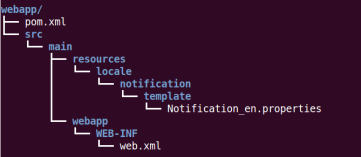
<?xml version="1.0" encoding="UTF-8"?>
<project xmlns="https://maven.apache.org/POM/4.0.0" xmlns:xsi="https://www.w3.org/2001/XMLSchemainstance"
xsi:schemaLocation="https://maven.apache.org/POM/4.0.0 https://maven.apache.org/maven-v4_0_0.xsd">
    <modelVersion>4.0.0</modelVersion>
    <parent>
        <groupId>com.acme.samples</groupId>
        <artifactId>console-notification</artifactId>
        <version>1.0.0</version>
    </parent>
    <artifactId>console-notification-webapp</artifactId>
    <packaging>war</packaging>
    <build>
        <finalName>console-notification-webapp</finalName>
    </build>
</project>
12. Add the following configurations to :
<?xml version="1.0" encoding="UTF-8"?>
<web-app version="3.0"
metadata-complete="true"
xmlns="https://java.sun.com/xml/ns/javaee"
xmlns:xsi="https://www.w3.org/2001/XMLSchema-instance"
xsi:schemaLocation="https://java.sun.com/xml/ns/javaee https://java.sun.com/xml/ns/javaee/web-app_3_0.xsd">
    <display-name>console-notification-webapp</display-name>
    <filter>
        <filter-name>ResourceRequestFilter</filter-name>
        <filter-class>org.exoplatform.portal.application.ResourceRequestFilter</filter-class>
    </filter>
    <filter-mapping>
        <filter-name>ResourceRequestFilter</filter-name>
        <url-pattern>/*</url-pattern>
    </filter-mapping>
</web-app>
– display-name — must be the same as the context name of the portal extension
13. Open the file and add this text:
###########################################
# UpdateProfilePlugin #
###########################################
# For UI
UINotification.title.UpdateProfilePlugin= Someone updates profile
UINotification.label.UpdateProfilePlugin= Someone updates profile
UINotification.subject.UpdateProfilePlugin= updated the profile information.
This is an English-language resource bundle. The and values will be used to display the English name of the new notification type through the user interface.
14. Go up to the parent project’s folder and build the project using the command
15. After successfully building the project, copy the generated jar and war files into the corresponding deployment folders in which you unpacked the eXo Platform installation.
16. Start the eXo Platform, and you will see your new functions appear in :
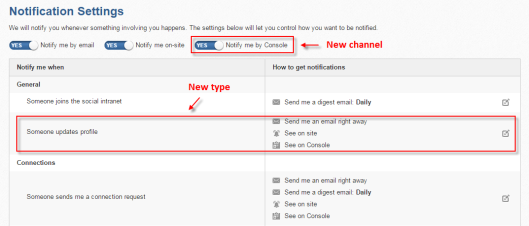
Remember to enable notification plugins on the administrator account, and then test these functions by updating any user’s avatar or experience. A message regarding this activity will be pushed to all notification channels, as shown below:
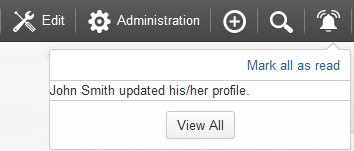
Alternatively, a message will be shown on the console for each user connecting with the above user, as shown below:
The source code used in this tutorial is available on github here.
Finally, I would like to thank the eXo DOC and SOC teams for their great comments!
(This article was originally posted on my blog: Lan Nguyen ~ Writing is sharing.)
Join the eXo tribe by registering for the community and get updates, tutorials, support, and access to the Platform and add-on downloads!

Make the most out of eXo Platform 4
Register to the next weekly live demo session and get a complete overview of what you can do with eXo Platform 4. Reserve your seat now!
Brahim Jaouane

I am a Digital Marketing specialist specialized in SEO at eXo Platform. Passionate about new technologies and Digital Marketing. With 10 years' experience, I support companies in their digital communication strategies and implement the tools necessary for their success. My approach combines the use of different traffic acquisition levers and an optimization of the user experience to convert visitors into customers. After various digital experiences in communication agencies as well as in B2B company, I have a wide range of skills and I am able to manage the digital marketing strategy of small and medium-sized companies.