
FREE WHITE PAPER
Artificial intelligence has rapidly become part of everyday work. Employees experiment with AI tools, generate content, and explore new ways to be more productive.
Extend eXo’s embedded AI by connecting external assistants such as Claude, ChatGPT or other MCP-enabled services to nearly 100 secure tools across collaboration, knowledge and productivity workflows.
Following the recent general availability of AI agents in eXo Platform, we are continuing to expand our vision of Controlled AI for the digital workplace.
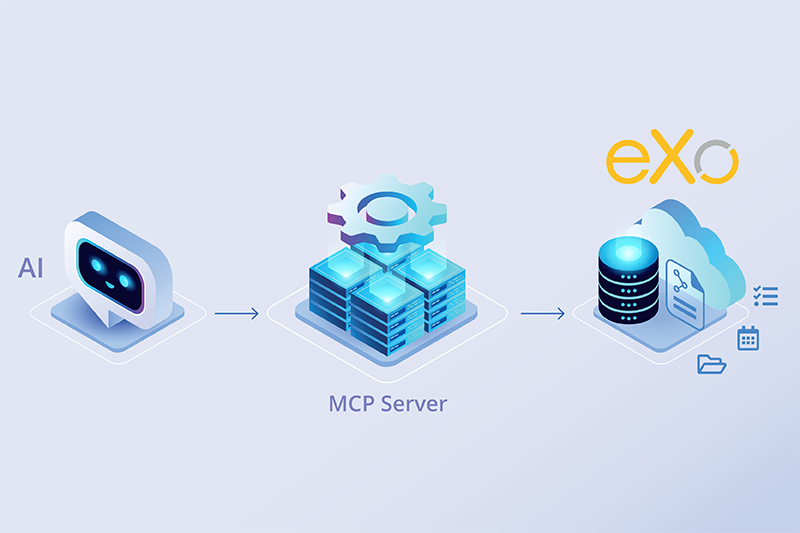
Our embedded AI capabilities already allow users to write, search, summarize, organize, and act directly inside eXo Platform, with secure contextual access to internal tools and information. Behind the scenes, this already relies on modern tool-based AI interactions, including MCP principles applied to eXo’s internal capabilities.
Today, we are taking the next step with a new announcement: the launch of the eXo MCP server.
The eXo MCP server opens eXo Platform to your favorite AI services, private enterprise agents, and broader AI ecosystems through the Model Context Protocol (MCP). It allows organizations to complement eXo’s native AI capabilities with their own preferred models, approved providers, or cross-system automation scenarios.
This means organizations can now choose the approach that best fits their strategy:
Connect favorite AI services (like Claude or ChatGPT) or private assitants for broader orchestration and multi-system workflows
Whether your priority is openness, sovereignty, flexibility, or control, the eXo MCP server gives you new options while keeping eXo Platform at the center of collaboration, knowledge, and action.
In this article, we explain what the eXo MCP server is, how it works, the tools it exposes, the governance model behind it, and the practical use cases it unlocks.
AI becomes truly valuable when it can do more than answer questions. To help users at work, they need to retrieve business information, interact with enterprise applications, and perform real actions such as creating tasks, publishing updates, or searching internal knowledge.
Traditional APIs already allow systems to connect, but they were designed primarily for developers and software applications. Model Context Protocol (MCP) takes a different approach: it exposes tools and capabilities in a format that AI models can understand and use directly. In simple terms, MCP helps translate business systems into something usable by large language models.
This matters because it transforms AI from request-response mode into operational one. Instead of only generating text, an AI assistant can use available tools (that is = features that can be called by LLMs on behalf of the user) to access relevant context, execute actions, and complete workflows across connected systems.
MCP is based on two key roles:
This model creates a powerful new architecture. A single AI assistant can connect to multiple MCP servers and interact with several business systems through one conversation. For example, it could retrieve information from a knowledge platform, create a task in a project management app, and generate a post in collaboration spaces in the same workflow.
For organizations, the benefits are immediate:
At eXo Platform, we have already embraced this evolution through our Controlled AI approach: embedding secure, contextual AI assistants directly into the digital workplace. Today, we are taking the next step by opening eXo capabilities to the broader AI ecosystem with our new MCP server.
To help organizations benefit from the growing AI ecosystem while maintaining control and security, eXo Platform now provides its own MCP server, allowing compatible external assistants and automation platforms to interact securely with eXo Platform through the Model Context Protocol.
It extends eXo’s existing Controlled AI strategy, where AI is already embedded directly into the digital workplace to help users write, search, summarize and act in context. With MCP, eXo capabilities can now also be accessed from external AI environments and multi-system workflows.
This creates two complementary approaches to AI usage:
Embedded AI inside eXo – best for everyday productivity directly in the platform:
External AI through MCP – best for broader orchestration and user-preferred assistants:
For users, this means more freedom to choose the assistants and ecosystems that fit their needs, while continuing to benefit from eXo as the secure hub for collaboration, knowledge and productivity.
By combining embedded AI inside the platform with open MCP integrations beyond it, eXo Platform gives organizations the best of both worlds: contextual assistance where work happens, and flexible AI ecosystems across their broader digital environment.
AI-Augmented Digital Workplace
Artificial intelligence has rapidly become part of everyday work. Employees experiment with AI tools, generate content, and explore new ways to be more productive.
Artificial intelligence has rapidly become part of everyday work. Employees experiment with AI tools, generate content, and explore new ways to be more productive.
One of the most tangible ways to appreciate what the eXo MCP server brings to the table is simply to look at what it exposes.
The server provides 98 tools spanning every major area of the eXo Platform, from collaboration spaces and task management, to content publishing, document handling, calendar events, and the social activity stream. This breadth is deliberate: rather than offering a narrow API for a single use case, the eXo MCP server gives AI agents genuine coverage of the digital workplace.
We asked Claude.ai itself to introspect our MCP server. Here is what he found out:
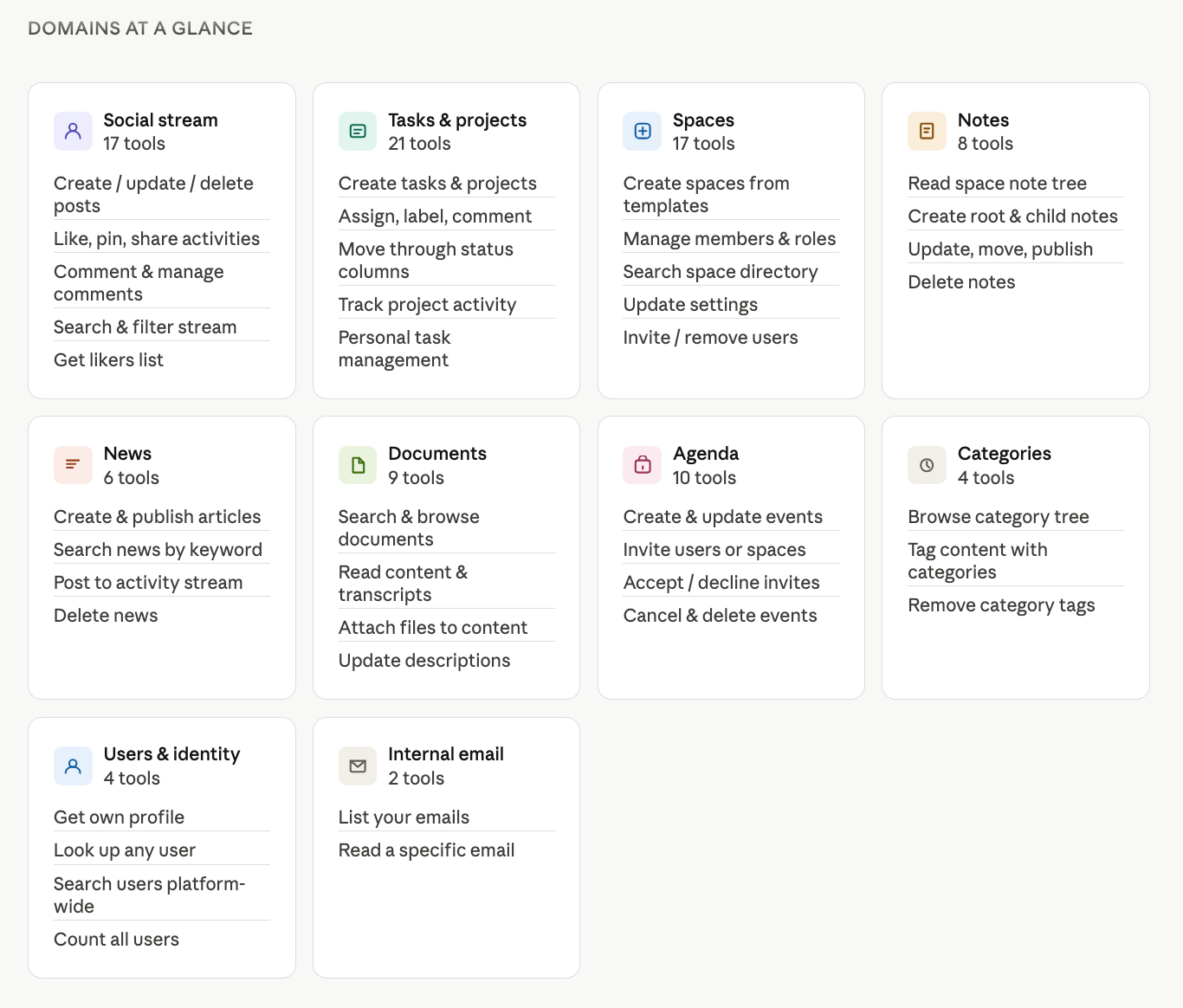
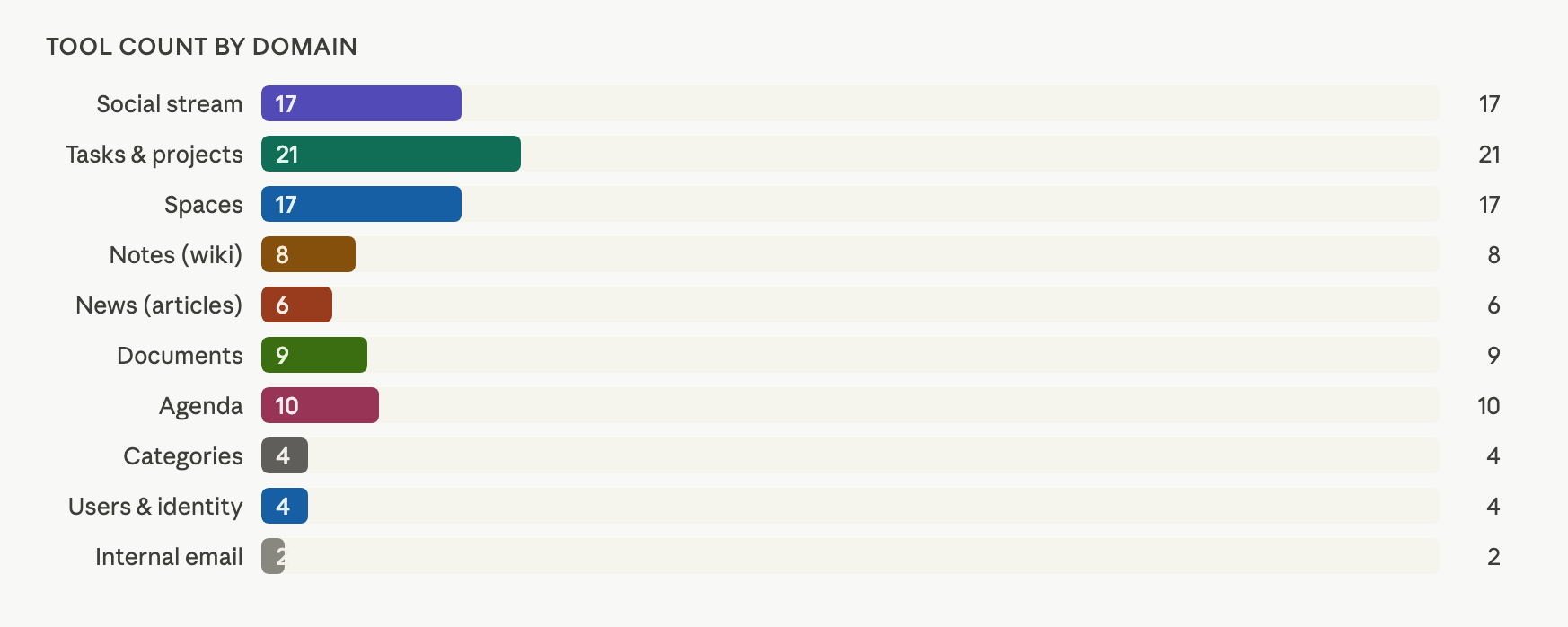
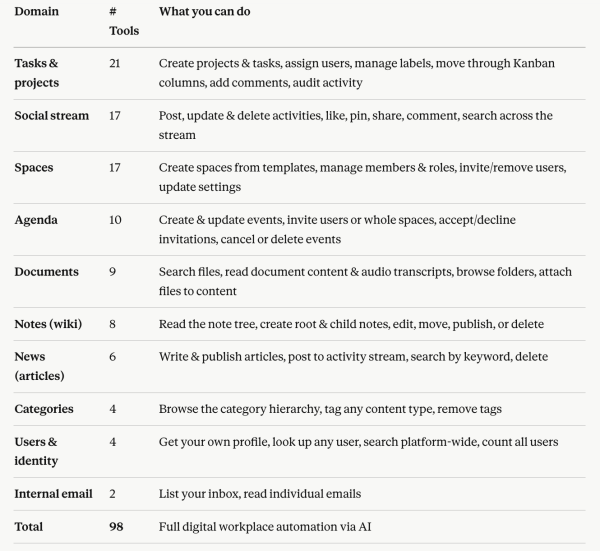
The three examples Claude picked are not exhaustive, they simply illustrate the range of possibilities. With 98 tools already available across ten domains, the surface area for AI-powered automation within eXo is already wide, and we are actively working on expanding it further with new tools and capabilities.
Video example: from research to publication in a few steps
To illustrate what the eXo MCP server makes possible in practice, this short demo shows an AI agent combining external intelligence with internal actions.
The agent first searches the web for information, then drafts structured content, creates and publishes a note inside eXo Platform, and finally the user shares it through an activity post.
A simple example of how AI can help accelerate the path from information gathering to content creation and communication.
That breadth of capabilities, however, naturally raises an important question: if AI agents can access powerful tools and actions, what guardrails are in place? This is exactly where eXo Platform’s Controlled AI approach applies. The next section explains how the eXo MCP server enforces security, permissions, and governance at every step.
Opening business systems to AI assistants creates new opportunities, but it also requires strong guardrails. At eXo Platform, this is approached through our Controlled AI framework: AI should be useful, but always governed, transparent, and aligned with organizational rules.
The eXo MCP server was designed with this principle from the start. It allows external systems to interact with eXo Platform while preserving existing security boundaries, administrative control, and user choice.
Organizations remain in control of which external ecosystems can connect to the platform.
Administrators can configure MCP availability.
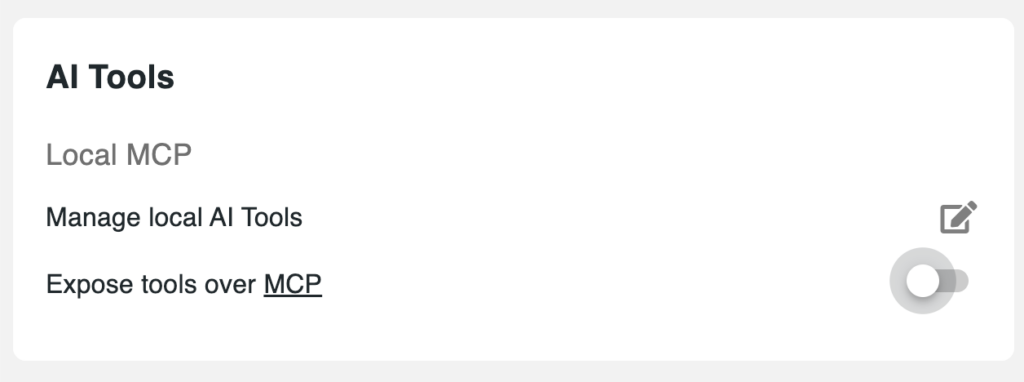
and they can also control which third-party services are authorized to use it over OAuth .
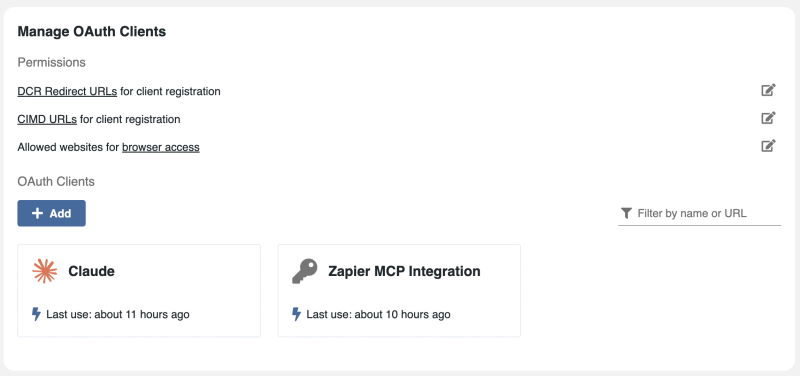
This creates an important trust layer by ensuring that only approved assistants or automation platforms can request access. Administrators can therefore progressively enable MCP according to their governance model, security policies, or preferred AI vendors.
Even when a service is approved by the administrator, no connection is made without the user’s explicit authorization.
When connecting an external assistant, users validate the connection through OAuth authentication and choose the permission scope they want to grant:
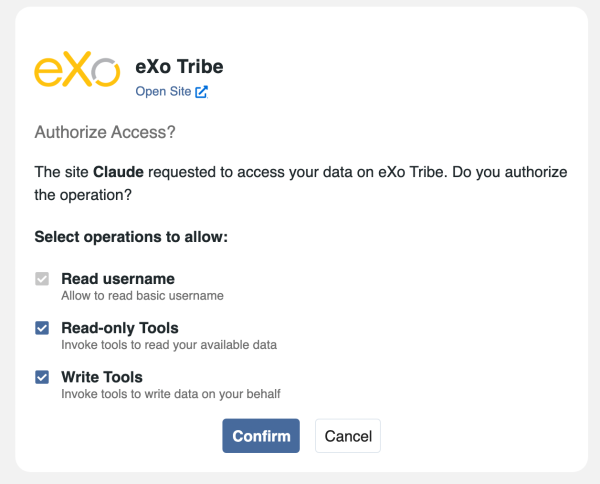
This gives users clear visibility and control over what an external assistant is allowed to do.
Authorization is not a one-time decision.
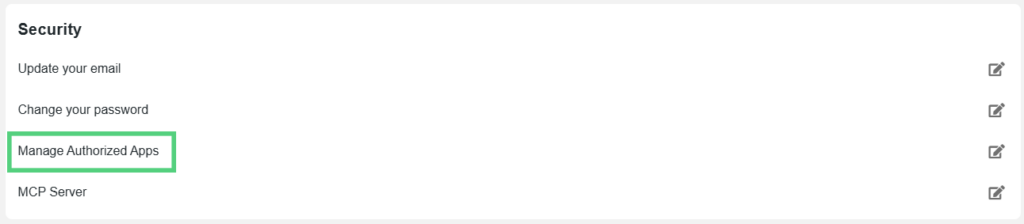
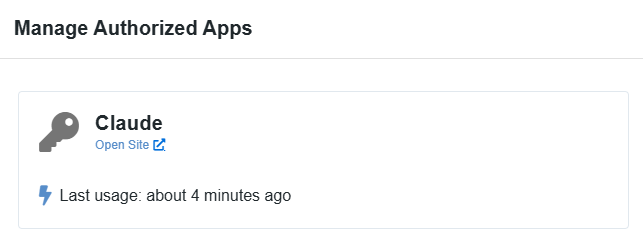
Once a connection is established, users gain access to a dedicated settings area where connected external applications can be managed at any time. From there, users can review active connections and revoke permissions whenever they choose.
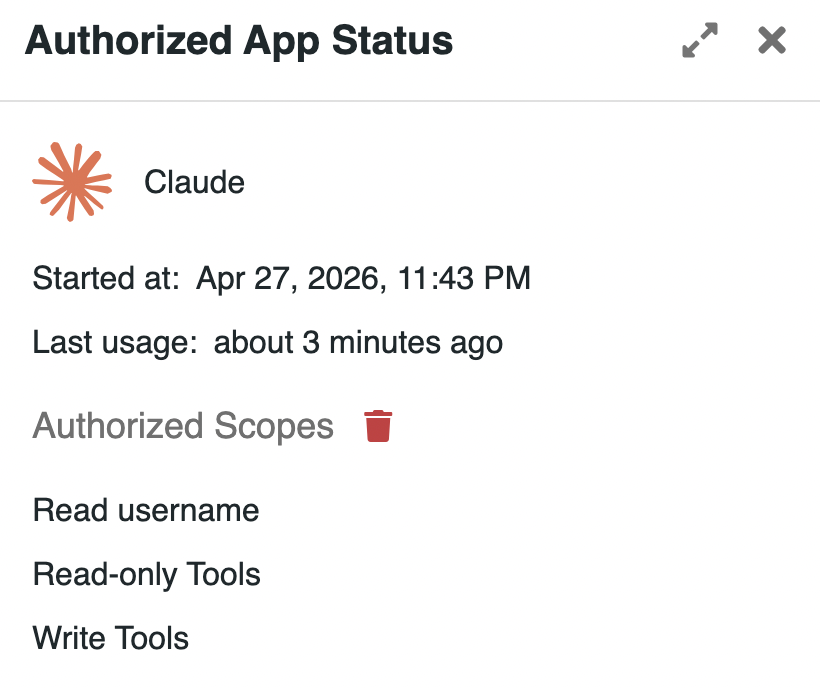
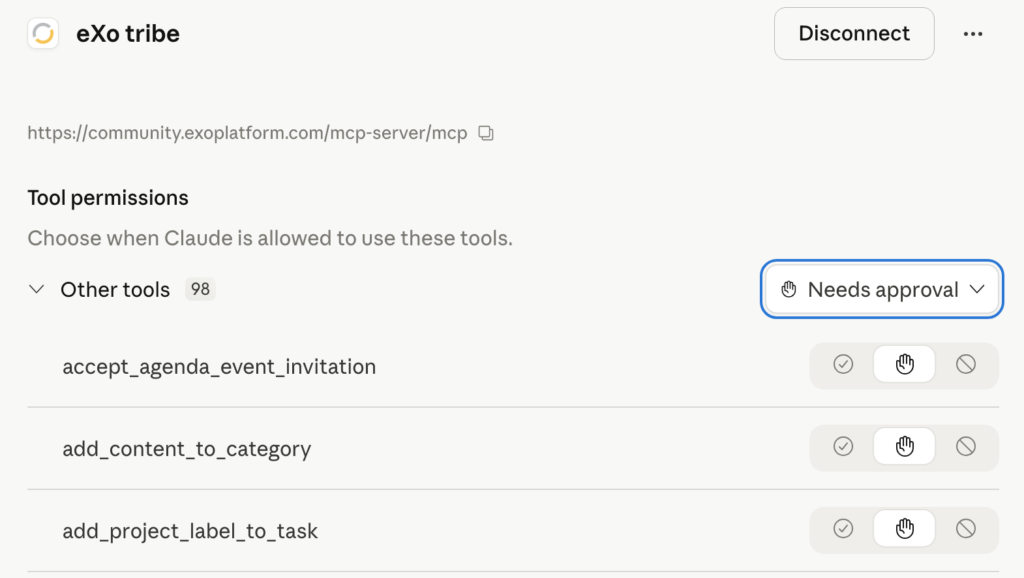
This ensures users remain in control throughout the lifecycle of the integration— – not only at the moment of connection.
The eXo MCP server does not bypass platform permissions.
External assistants only access the tools, content, spaces, and information that the authenticated user is already allowed to access inside eXo Platform. If a user cannot see or modify something in eXo, the connected assistant cannot either.
This ensures that existing permission models, space boundaries, and access rights remain fully enforced.
Combined together, the protection model is built on multiple layers:
The goal of the eXo MCP server is not simply to connect AI to business tools, but do so responsibly.
By combining open standards with governance controls, eXo Platform enables organizations to adopt the next generation of AI assistants without compromising security, sovereignty, or trust.
One of the strengths of the eXo MCP server is that it complements eXo’s existing embedded AI capabilities rather than replacing them. Organizations can combine native in-platform assistance with external AI agents and multi-system workflows, depending on the use case.
Some scenarios are best handled directly inside the digital workplace, where AI benefits from native context and seamless user experience. Others are better suited to external assistants that can coordinate several systems, use preferred models, or combine broader data sources.
Below are a few illustrative examples.
When users are already working inside eXo Platform, embedded AI often provides the most natural experience.
Examples include:
Because this AI is built directly into the platform, it can operate where work already happens, with minimal friction and strong contextual awareness.
For a deeper overview of eXo’s native AI capabilities, see our recent AI release article.
Other scenarios benefit from using an external assistant connected through MCP.
Examples include:
In these cases, the external agent acts as an orchestration layer across several environments, while eXo remains the secure workplace hub.
There is no single way to use AI at work. Some scenarios benefit from embedded assistance directly inside the digital workplace, where context and immediacy matter most. Others benefit from external agents that can combine multiple systems, broader data sources, or user-preferred models.
The eXo MCP server allows organizations to match each use case with the most relevant approach, while keeping eXo Platform at the center of collaboration, knowledge, and action.
Getting started with the eXo MCP server is designed to be simple and user-driven.
The service is immediately available in supported cloud environments, including eXo Hubs, as well as for OEM partners such as Orange Business and its Live Collaboration offering.
eXo Hubs users can currently connect selected authorized services including Anthropic , OpenAI , and Mistral AI MCP clients. Additional compatible services will be added over time.
For private cloud or dedicated environments, available external services and connection options can be configured by administrators according to each organization’s governance and security policies.
This short demo shows how quickly a user can connect a compatible external assistant to the eXo MCP server, using the personal MCP URL, secure OAuth validation, and permission approval, then manage or remove access at any time from user settings.
Each user can access a dedicated MCP entry in their personal settings within eXo Platform.
From there, users can copy their personal MCP connection URL, which is used to link their account with a compatible external assistant or automation platform.

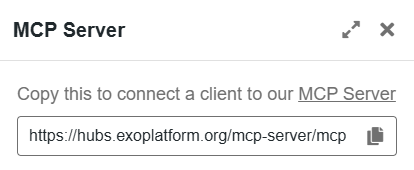
Users then go to their chosen MCP-compatible service and follow that provider’s connection process.
For example, with Claude AI, users simply open the MCP configuration area, paste their eXo MCP URL, and follow the guided setup steps. Similar flows apply to other supported assistants and compatible clients.
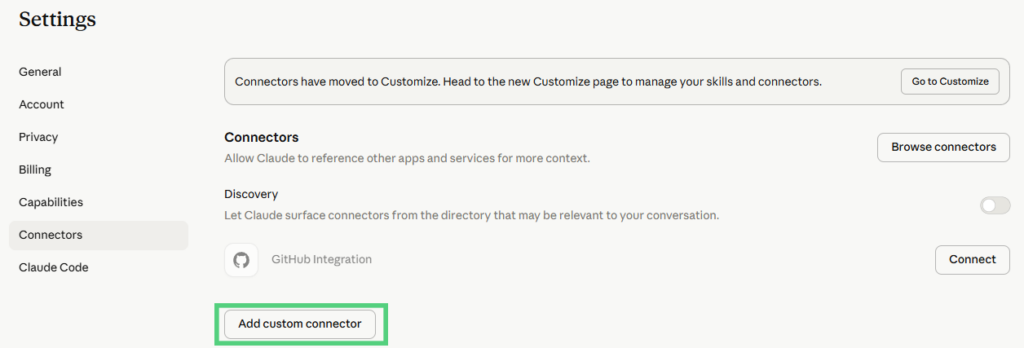
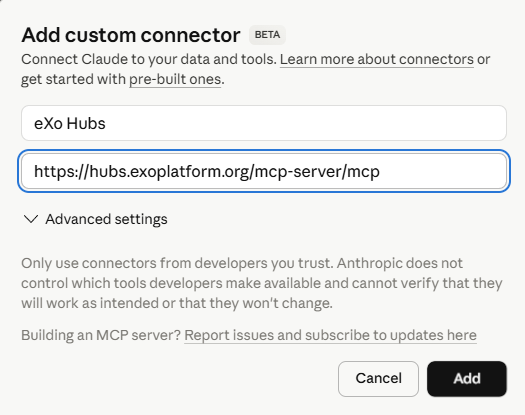
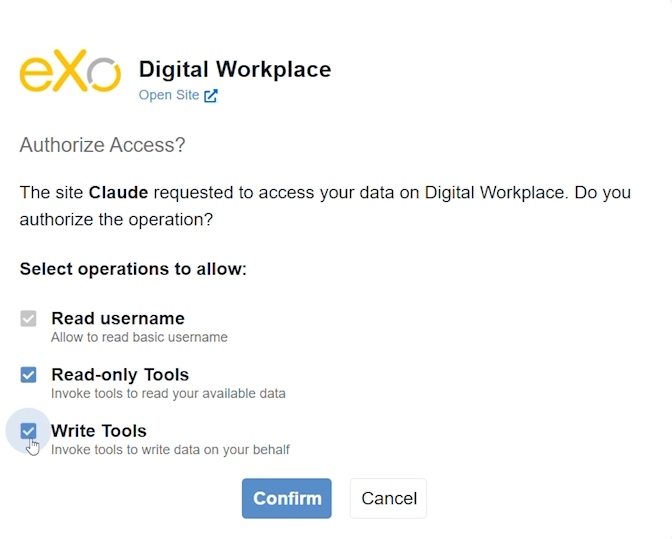
During setup, users are redirected to eXo Platform for secure OAuth authentication.
At this stage, users explicitly approve the connection and choose the level of access they want to grant:
No access is granted without user consent.
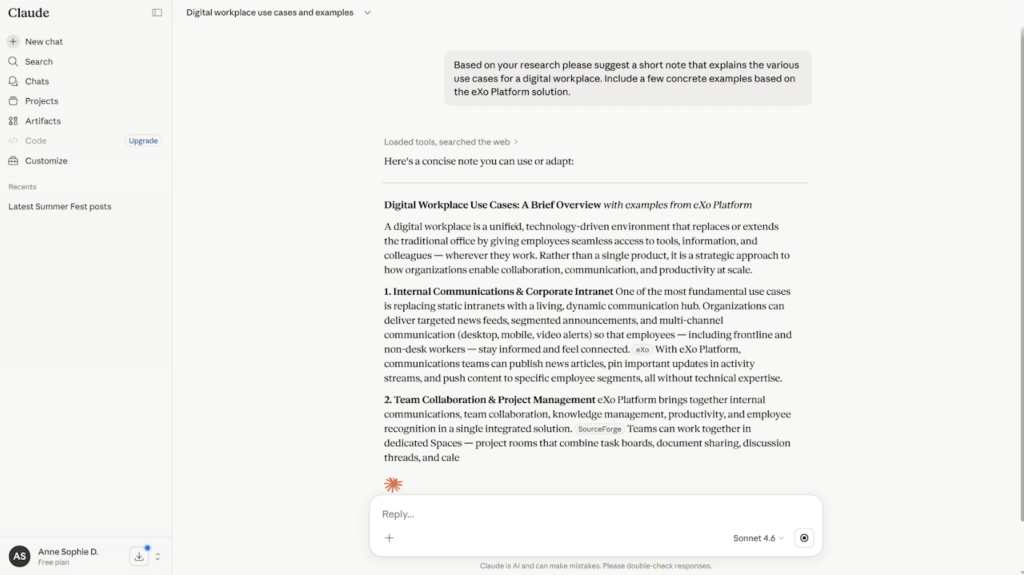
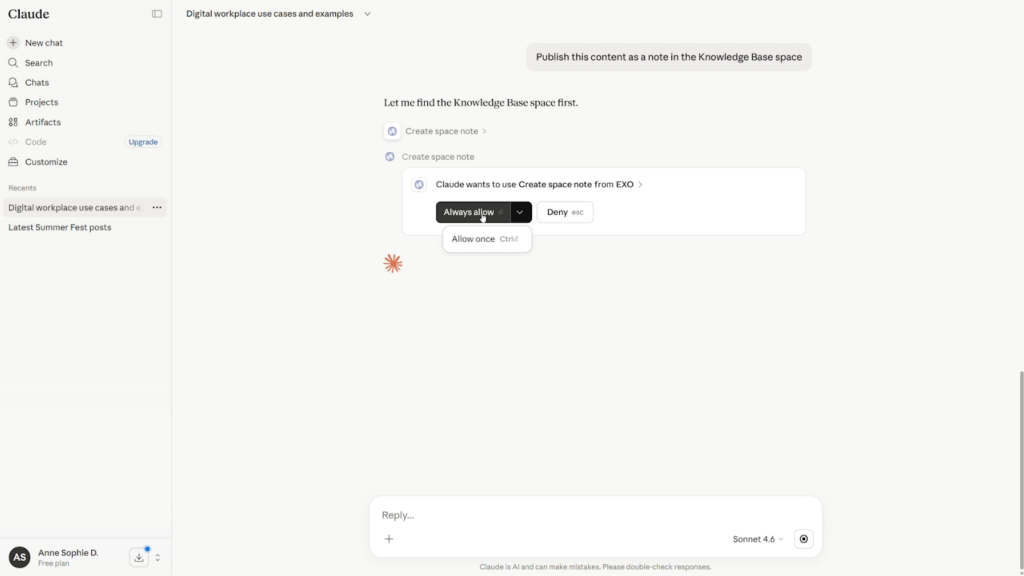
Once connected, the assistant can immediately use the eXo tools available to that user, always within existing permissions and governance rules.
Users can then ask their assistant to search internal knowledge, retrieve context, create content, trigger actions, or participate in broader workflows depending on granted permissions.
Connected applications remain visible in user settings.
Users can review active integrations and revoke permissions or disconnect a client whenever they choose.
This ensures that access remains transparent, reversible, and fully under user control.
There is no single model for enterprise AI adoption, and there should not be one.
Some organizations will prefer to keep AI usage fully internal, operating in tightly controlled environments with approved models, private infrastructure, and limited external connectivity. eXo Platform fully supports this approach through its embedded Controlled AI capabilities, flexible model choices, and secure governance options.
Others will choose a more open model, where trusted external assistants, broader ecosystems, and cross-platform workflows bring additional productivity and innovation. Teams using eXo Hubs for example, can immediately benefit from this openness by connecting compatible assistants and automation tools.
The eXo MCP server was designed to support both strategies.
It can connect to public AI ecosystems such as Anthropic Claude, OpenAI-compatible clients, or Mistral AI environments. But it can also be used with private enterprise agents already approved within an organization.
This is a key point: MCP is not only about accessing public LLM services. It is also a standard way to connect internal assistants to business applications.
For example, an organization using a broader sovereign or private AI environment, such as Orange Business with Live Intelligence, or Wikit, can use trusted agents that interact with eXo Platform while also working across other enterprise systems.
In that model, users gain the same benefits:
All of this can happen without relying on open public web services.
Whether an organization chooses a closed model, an open model, or a hybrid approach, eXo Platform provides the flexibility to adapt.
With embedded AI inside the platform and the eXo MCP server beyond it, eXo combines secure in-context assistance with connected agent ecosystems, on your terms, with your governance model, and at your own pace.

Download the eXo Platform Datasheet and discover all the features and benefits

Download the eXo Platform Datasheet and discover all the features and benefits
( Your e-mail address will not be published)

I am the Chief Executive Officer of eXo Platform (the open source digital workplace platform), a company that I co-founded while in college and that I came back to after several years in the banking and consulting industry. I blog about modern work, about open-source and sovereignty issues. Occasionally, I also blog about my personal areas of interest, such as personal development, work–life balance, sustainability and gender equality.