Try now Demo en
  • en
  • fr
  • de
  • Solutions
    • Use cases
      • Modern IntranetBuild strong internal culture & sense of belonging
      • Collaboration PlatformEfficient teamwork and project collaboration
      • Social NetworkEngage users & recognize contributions
      • Knowledge hubCentralize, organize and share company knowledge
      • Application PortalUnified access to business applications and information
    • Switch to eXo
      • Microsoft 365 AlternativeAn open-source digital workplace alternative to M365
      • Migrate to eXo PlatformA guided, secure migration path from your existing tools to eXo
  • Product
    • Overview
      • Platform overviewExplore core capabilities
      • Why eXoKey differentiators
      • InternationalisationMultilingual environments
      • MobileBranded mobile applications
    • Platform
      • No CodeTailor to your needs without code
      • IntegrationsConnectors & extension capabilities
      • Controlled AIGoverned, extensible AI
    • Technology
      • ArchitectureArchitecture & technology
      • SecuritySecurity measures
      • Open sourceComponents & licensing
  • Offers
    • EnterprisePrivate cloud or on-premise deployments
    • eXo HubsReady-to-use SaaS edition for teams
    • Compare EditionsCompare editions and choose the right fit
    • OEM EditionFor software vendors & service providers
    • ServicesDiscover eXo professional services
  • Resources
    • Resource center
      • Case studies
      • White Papers
      • Datasheets
      • Videos
    • FAQsAbout the software, the community and our offers
      • Platform & Use Cases
      • AI & Responsible AI
      • Deployment, Security & Compliance
      • Open-source, Pricing & Services
    • From The Blog
      • eXo Platform 7.1 is released
      • Digital sovereignty: when public organizations move from words to action
      • Cloud Vs On-premise Digital Workplace: Which one is right for your business?
  • Community
    • CommunityJoin our online community platform
    • DownloadLaunch eXo platform in your infrastructure
    • Source codeSource code on github
    • REST APIs & DocumentationAll REST APIs available in eXo Platform
  • Company
    • About us
    • Customers
    • Partners
    • Contact us
    • Newsroom
  • Menu mobile
    • Enterprise Offers
    • Blog
    • About us
    • Resource center
    • Careers
    • Contact us
    • Try eXo
Use cases
  • Modern Intranet Build strong internal culture & sense of belonging
  • Collaboration Platform Efficient teamwork and project collaboration
  • Social Network Engage users & recognize contributions
  • Knowledge hub Centralize, organize and share company knowledge
  • Application Portal Unified access to business applications and information
Switch to eXo
  • Microsoft 365 Alternative An open-source digital workplace alternative to M365
  • Migrate to eXo Platform A guided, secure migration path from your existing tools to eXo
Overview
  • Platform overview Explore core capabilities
  • Why eXo Key differentiators
  • Internationalisation Multilingual environments
  • Mobile Branded mobile applications
Platform
  • No Code Tailor to your needs without code
  • Integrations Connectors & extension capabilities
  • Controlled AI Governed, extensible AI
Technology
  • Architecture Architecture & technology
  • Security Security measures
  • Open source Components & licensing
Enterprise Private cloud or on-premise deployments
eXo Hubs Ready-to-use SaaS edition for teams
Compare Editions Compare editions and choose the right fit
OEM Edition For software vendors & service providers
Services Discover eXo professional services
Resource center
  • Case studies
  • White Papers
  • Datasheets
  • Videos
FAQs About the software, the community and our offers
  • Platform & Use Cases
  • AI & Responsible AI
  • Deployment, Security & Compliance
  • Open-source, Pricing & Services
From The Blog
  • eXo Platform 7.1 is released
  • Digital sovereignty: when public organizations move from words to action
  • Cloud Vs On-premise Digital Workplace: Which one is right for your business?
Community Join our online community platform
Download Launch eXo platform in your infrastructure
Source code Source code on github
REST APIs & Documentation All REST APIs available in eXo Platform
About us
Customers
Partners
Contact us
Newsroom
Enterprise Offers
Blog
About us
Resource center
Careers
Contact us
Try eXo
  1. Accueil
  2. Uncategorized
  3. 4 Simple Steps to Add a Twitter Feed Gadget to Your Intranet Homepage

4 Simple Steps to Add a Twitter Feed Gadget to Your Intranet Homepage

eXo Platform 4 provides many features for building rich websites out of the box. But you can also use the platform’s web-based IDE to build custom plug-ins or gadgets that add an almost limitless number of capabilities. We wrote a simple gadget that displays a Twitter feed of all the recent company-related tweets, which is an easy way to display fresh content on a site’s homepage. This tutorial will guide you through the process of creating the Twitter gadget and adding it to a website page.

To be able to complete this how-to, you will need eXo Platform Enterprise Edition 4.0 up and running.

Step 1: Generating the Twitter Widget

To integrate the standard Twitter gadget, first go to the Twitter widget page. Click “Create new” to create a new widget.
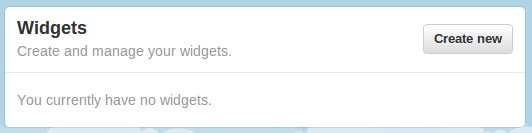
01-create-new-widget

Switch to the Search tab and fill in the search query for the type of feed you want to display (in our case, we want to display any tweets from our company account or our CEO, so we entered @exoplatform or @benjmestrallet). Click on “Create widget”.
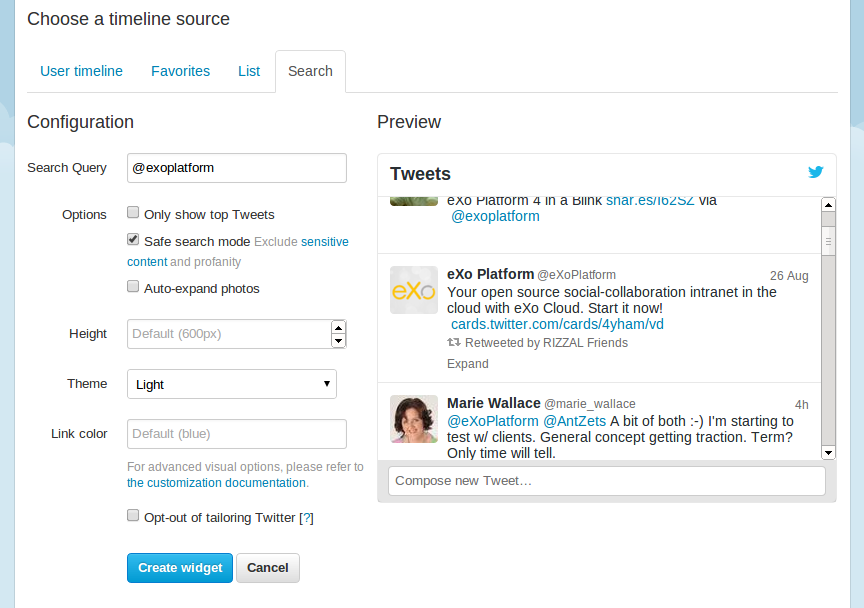
02-choose-timeline-source

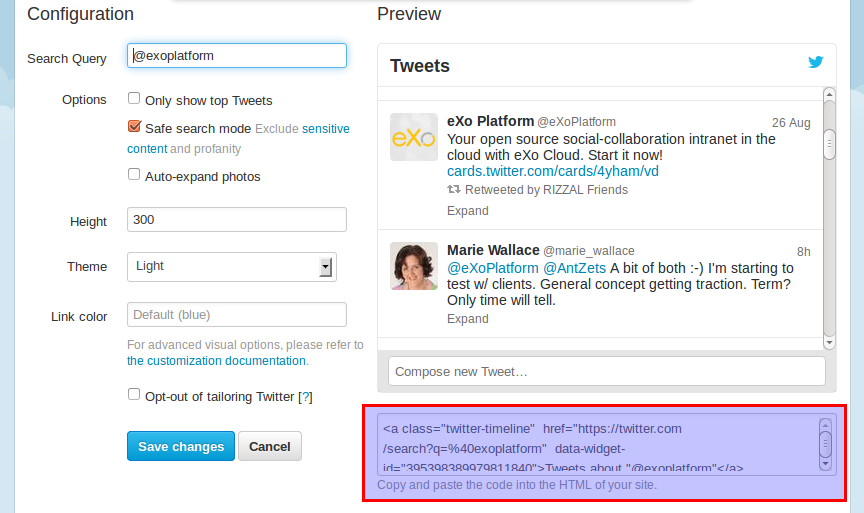
Copy the generated code.

03-copy-generate-code

Step 2: Creating the Gadget in your eXo Platform Intranet

Log in to eXo Platform portal as an administrator. In the “Administration” dropdown menu, go to the IDE. In IDE app, select menu File à New à Google Gadget. Specify a name for your gadget (e.g., TwitterFeed.xml). In the CData tag, paste the widget code provided by Twitter.

Our code looks like this:

<?xml version="1.0" encoding="UTF-8"?>
<Module>
 <ModulePrefs title="TwitterFeed"/>
 <Content type="html">
 <![CDATA[
 <a class="twitter-timeline" width='250' href="https://twitter.com/search?q=%40exoplatform" data-widget-id="395398389979811840">Tweets about "@exoplatform"</a>
 <script>
        !function(d,s,id){
         var js,fjs=d.getElementsByTagName(s)[0],p=/^https:/.test(d.location)?'http':'https';
         if(!d.getElementById(id)){
                js=d.createElement(s);js.id=id;
                js.src=p+"://platform.twitter.com/widgets.js";
                fjs.parentNode.insertBefore(js,fjs);
         }
        }(document,"script","twitter-wjs");
 </script>
]]>
        </Content>
</Module>

If you want to see your gadget working from within the IDE, click on Run à Show preview from the menu.
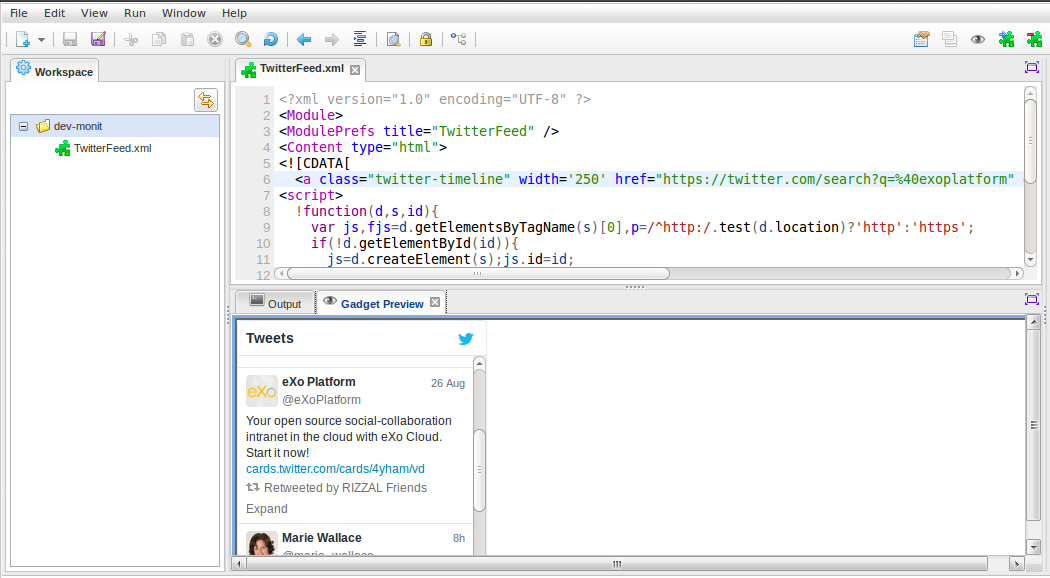
04-eXo-IDE

To finish, go to the “Run” menu and click on “Deploy gadget to GateIn”.

Step 3: Adding the Gadget to the Application Registry

Before you can insert the gadget into a page, you need to make it available to webmasters by adding it to a category in the application registry. To do this, go to Administration à Applications. Click on the button “Gadget” and find your gadget on the list (we named ours “TwitterFeed”). When you are in your gadget, select “Click here to add into categories”. Choose the category “social” and validate.

Step 4: Inserting the Widget into Your Intranet Homepage

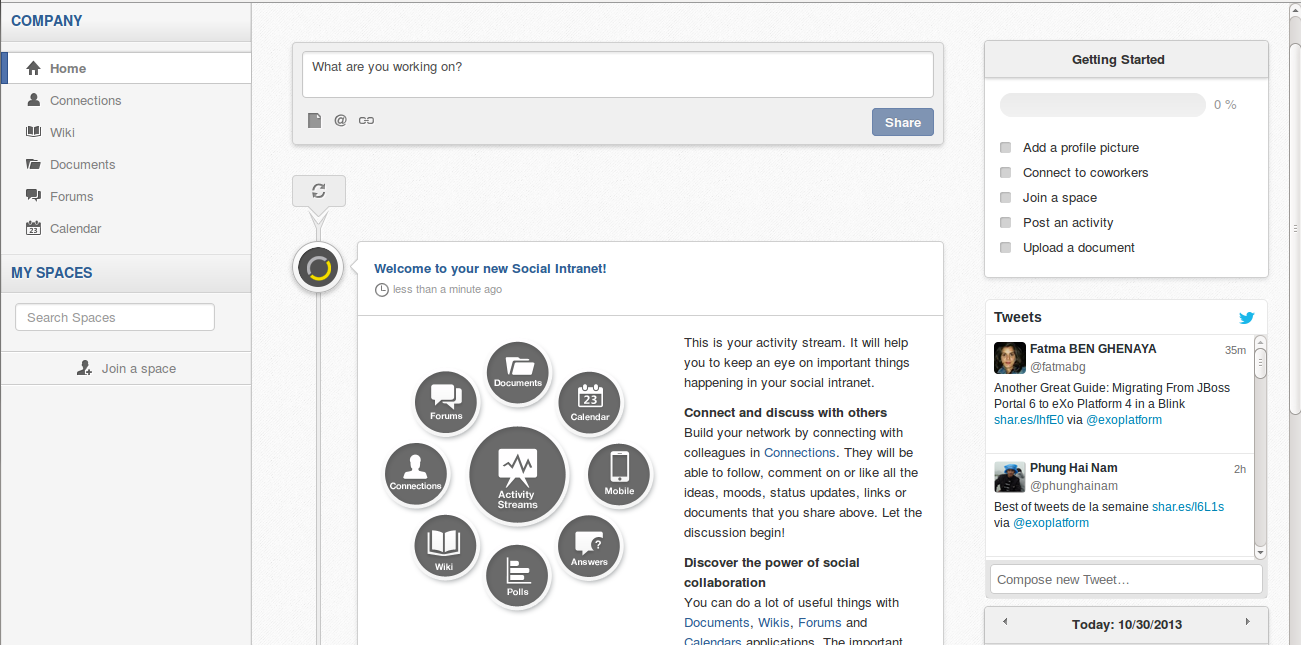
Now you are done with the configuration, so you can insert the new Twitter widget into the intranet homepage. On the homepage, from the “Edit” menu, select Page à Edit Layout. In the editor, simply drag-and-drop the gadget onto the page. Here is the result:
05-Result

Conclusion

In only four simple steps, you should now have a custom Twitter feed integrated into your homepage. You can also quickly integrate any kind of widget into your portal following this process.

Questions? Remarks? Join the discussion on the eXo Community!


make-the-most-out-of-eXo-platform4

Make the most out of eXo Platform 4

Register to the next webinar and get a complete overview of what you can do with eXo Platform 4. Reserve your seat now!

Brahim Jaouane

I am a Digital Marketing specialist specialized in SEO at eXo Platform. Passionate about new technologies and Digital Marketing. With 10 years' experience, I support companies in their digital communication strategies and implement the tools necessary for their success. My approach combines the use of different traffic acquisition levers and an optimization of the user experience to convert visitors into customers. After various digital experiences in communication agencies as well as in B2B company, I have a wide range of skills and I am able to manage the digital marketing strategy of small and medium-sized companies.

Full-featured digital workplace with everything your employees need to work efficiently, smartly integrated for a compelling employee experience

  • Product
    • Software tour
    • Internationalisation
    • Mobile
    • No Code
    • Architecture
    • Integrations
    • Security
    • Open Source
  • Uses cases
    • Employee Portal
    • Knowledge management
    • Entreprise Social Network
    • Employee Engagement
    • Community Management
    • Extranet
  • Guides
    • What is a digital workplace?
    • Intranet guide
    • What is an extranet?
    • Employee engagement
    • Collaboration guide
    • Teamwork guide
    • Internal Communication guide
  • Enterprise
    • Product offer
    • Services Offer
    • Customers
    • About us
  • Resources
    • FAQs
    • Resource Center
    • Intranet Portal
    • What Is a Collaboration Software?
    • Talent Management
    • Employee Connection
    • Employee Intranet
    • Improve internal communication
    • eXo Tribe
  • Terms and Conditions
  • Legal
  • Privacy Policy
  • Accessibility
  • Contact us
  • Sitemap
  • Facebook
  • Twitter
  • LinkedIn
wpDiscuz