Try now Demo en
  • en
  • fr
  • de
  • Solutions
    • Use cases
      • Modern IntranetBuild strong internal culture & sense of belonging
      • Collaboration PlatformEfficient teamwork and project collaboration
      • Social NetworkEngage users & recognize contributions
      • Knowledge hubCentralize, organize and share company knowledge
      • Application PortalUnified access to business applications and information
    • Switch to eXo
      • Microsoft 365 AlternativeAn open-source digital workplace alternative to M365
      • Migrate to eXo PlatformA guided, secure migration path from your existing tools to eXo
  • Product
    • Overview
      • Platform overviewExplore core capabilities
      • Why eXoKey differentiators
      • InternationalisationMultilingual environments
      • MobileBranded mobile applications
    • Platform
      • No CodeTailor to your needs without code
      • IntegrationsConnectors & extension capabilities
      • Controlled AIGoverned, extensible AI
    • Technology
      • ArchitectureArchitecture & technology
      • SecuritySecurity measures
      • Open sourceComponents & licensing
  • Offers
    • EnterprisePrivate cloud or on-premise deployments
    • eXo HubsReady-to-use SaaS edition for teams
    • Compare EditionsCompare editions and choose the right fit
    • OEM EditionFor software vendors & service providers
    • ServicesDiscover eXo professional services
  • Resources
    • Resource center
      • Case studies
      • White Papers
      • Datasheets
      • Videos
    • FAQsAbout the software, the community and our offers
      • Platform & Use Cases
      • AI & Responsible AI
      • Deployment, Security & Compliance
      • Open-source, Pricing & Services
    • From The Blog
      • eXo Platform 7.1 is released
      • Digital sovereignty: when public organizations move from words to action
      • Cloud Vs On-premise Digital Workplace: Which one is right for your business?
  • Community
    • CommunityJoin our online community platform
    • DownloadLaunch eXo platform in your infrastructure
    • Source codeSource code on github
    • REST APIs & DocumentationAll REST APIs available in eXo Platform
  • Company
    • About us
    • Customers
    • Partners
    • Contact us
    • Newsroom
  • Menu mobile
    • Enterprise Offers
    • Blog
    • About us
    • Resource center
    • Careers
    • Contact us
    • Try eXo
Use cases
  • Modern Intranet Build strong internal culture & sense of belonging
  • Collaboration Platform Efficient teamwork and project collaboration
  • Social Network Engage users & recognize contributions
  • Knowledge hub Centralize, organize and share company knowledge
  • Application Portal Unified access to business applications and information
Switch to eXo
  • Microsoft 365 Alternative An open-source digital workplace alternative to M365
  • Migrate to eXo Platform A guided, secure migration path from your existing tools to eXo
Overview
  • Platform overview Explore core capabilities
  • Why eXo Key differentiators
  • Internationalisation Multilingual environments
  • Mobile Branded mobile applications
Platform
  • No Code Tailor to your needs without code
  • Integrations Connectors & extension capabilities
  • Controlled AI Governed, extensible AI
Technology
  • Architecture Architecture & technology
  • Security Security measures
  • Open source Components & licensing
Enterprise Private cloud or on-premise deployments
eXo Hubs Ready-to-use SaaS edition for teams
Compare Editions Compare editions and choose the right fit
OEM Edition For software vendors & service providers
Services Discover eXo professional services
Resource center
  • Case studies
  • White Papers
  • Datasheets
  • Videos
FAQs About the software, the community and our offers
  • Platform & Use Cases
  • AI & Responsible AI
  • Deployment, Security & Compliance
  • Open-source, Pricing & Services
From The Blog
  • eXo Platform 7.1 is released
  • Digital sovereignty: when public organizations move from words to action
  • Cloud Vs On-premise Digital Workplace: Which one is right for your business?
Community Join our online community platform
Download Launch eXo platform in your infrastructure
Source code Source code on github
REST APIs & Documentation All REST APIs available in eXo Platform
About us
Customers
Partners
Contact us
Newsroom
Enterprise Offers
Blog
About us
Resource center
Careers
Contact us
Try eXo
  1. Accueil
  2. Uncategorized
  3. Brand new XWiki 5 integrated into the upcoming eXo Platform 4.1

Brand new XWiki 5 integrated into the upcoming eXo Platform 4.1

Platform 4.1 will be introducing an upgraded version of XWiki thanks to the XWiki team, which has been incredibly supportive throughout the process, Platform 4.1 will benefit from XWiki 5.0, which includes different bug fixes related to the rendering engine, and it will also support new macros such as:

Formula Macro (LaTex Syntax)

[table th=”0″ border=”1″]
{{formula fontSize=”small”}}\sum_{n=1}^\infty\frac{1}{n^2} = \frac{\pi^2}{6}{{/formula}} [attr style=”border: 1px solid black; font-size: 13px; padding-top: 27px;”] | formula-macro [attr style=”border: 1px solid black;”]
[/table]
Latex syntax is one of the most famous ways to generate nice formula with more than 150 mathematical symbols.

HTML Macro


[table th=”0″ border=”1″ ]

{{html clean="false"}}
<html>
	<head>
    	<style>
    	.black_overlay{
            display: none;
            position: absolute;top: 0%;
            left: 0%;width: 100%;
            height: 100%;z-index:1001; 
        }
    	.white_content {
            display: none;
            position: absolute;
            top: 25%;left: 25%;
            width: 50%;height: 50%;
            padding: 16px;border: 3px solid #0088CC; 
            background-color: white; 
            z-index:1002;
            overflow: auto;
        }
	</style>
	</head>
	<body>
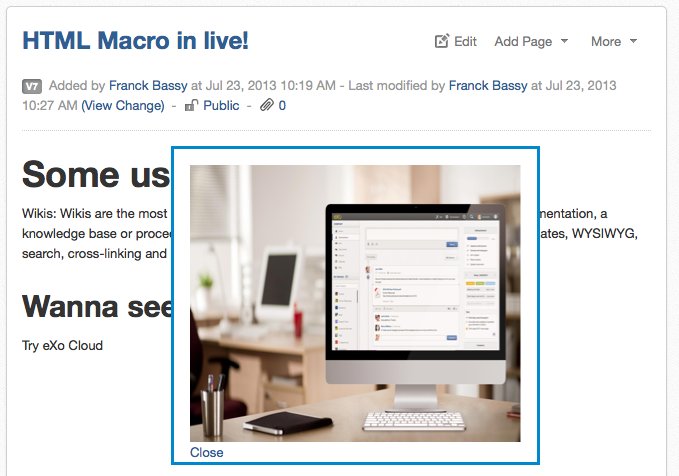
    	<p> <a href = "javascript:void(0)" onclick = "document.getElementById('light').style.display='block';document.getElementById('fade').style.display='block'">Click here</a></p>
    	<div id="light" class="white_content"><img style="height: 277px;" src="https://www.exoplatform.com/"> <br /><a href = "javascript:void(0)" onclick = "document.getElementById('light').style.display='none';document.getElementById('fade').style.display='none'">Close</a></div>
    	<div id="fade" class="black_overlay"></div>
	</body>
</html>
{{/html}}

[attr style=”border: 1px solid black; font-size: 13px;”] | image and css [attr style=”border: 1px solid black;padding-top: 19px;”]
[/table]

You can render any kind of HTML code inside your wiki page; moreover, you can also use your wiki syntax inside with the parameter wiki=”true”!

Footnote Macro & Put Footnotes Macro


[table th=”0″ border=”1″]
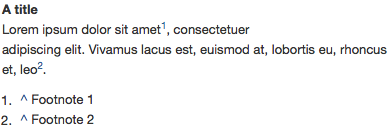
A title~~Lorem ipsum dolor sit amet{{footnote}}Footnote 1{{/footnote}}, consectetuer~~adipiscing elit. Vivamus lacus est, euismod at, lobortis eu, rhoncus~~et, leo{{footnote}}Footnote 2{{/footnote}}.~~{{putFootnotes/}} [attr style=”border: 1px solid black;font-size: 13px;”] | footnote-macro [attr style=”border: 1px solid black;”]
[/table]

Creating a knowledge referential is always useful, especially when you can easily add some references. You will not have to manage the order or the rendering, as this macro will do it for you.

Rss Macro


[table th=”0″ border=”1″]
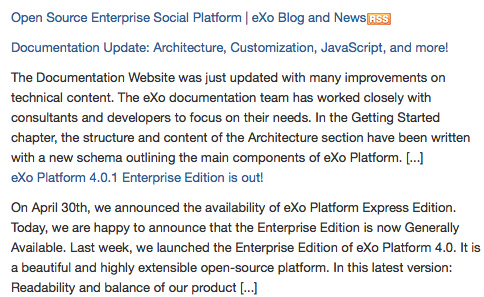
{{rss feed=”http://localhost/exoblog/feed/” content=”true” image=”true” count=”2″ /}} [attr style=”border: 1px solid black;font-size: 13px;”] | rss-macro [attr style=”border: 1px solid black;”]
[/table]

Keep an eye on some rss inside your wiki pages. Some parameters are available to display the content as an excerpt, to display a thumbnail if one exists, and to set the number of items you want to display!

Chart Macro


[table th=”0″ border=”1″]

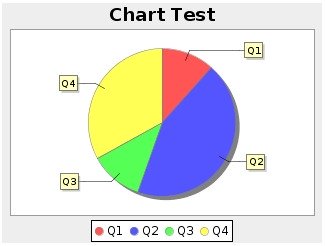
{chart type="bar" 
params="document:Main.Data;table:table1;
range:B2-D5;series:columns;" title="Chart Test" 
width="320" height="240"}}
|=|=X|=Y|=Z
|Q1|1.2|3.4|1.3
|Q2|4.5|3.4|2.3
|Q3|1.2|4.5|9.0
|Q4|3.4|1.2|1.2
{{/chart}

[attr style=”border: 1px solid black;font-size: 13px;”] | chart-macro-pie [attr style=”border: 1px solid black;”]
[/table]

The chart macro should display any information that you would like to present: it’s possible to create bar chart, line chart, steps chart, and more…

XWiki 5 will be integrated into Platform 4.1, and while we just showed you a sneak peek of the edition’s capabilities, much more is coming!

Franck Bassy

Full-featured digital workplace with everything your employees need to work efficiently, smartly integrated for a compelling employee experience

  • Product
    • Software tour
    • Internationalisation
    • Mobile
    • No Code
    • Architecture
    • Integrations
    • Security
    • Open Source
  • Uses cases
    • Employee Portal
    • Knowledge management
    • Entreprise Social Network
    • Employee Engagement
    • Community Management
    • Extranet
  • Guides
    • What is a digital workplace?
    • Intranet guide
    • What is an extranet?
    • Employee engagement
    • Collaboration guide
    • Teamwork guide
    • Internal Communication guide
  • Enterprise
    • Product offer
    • Services Offer
    • Customers
    • About us
  • Resources
    • FAQs
    • Resource Center
    • Intranet Portal
    • What Is a Collaboration Software?
    • Talent Management
    • Employee Connection
    • Employee Intranet
    • Improve internal communication
    • eXo Tribe
  • Terms and Conditions
  • Legal
  • Privacy Policy
  • Accessibility
  • Contact us
  • Sitemap
  • Facebook
  • Twitter
  • LinkedIn
wpDiscuz