Try now Demo en
  • en
  • fr
  • de
  • Solutions
    • Use cases
      • Modern IntranetBuild strong internal culture & sense of belonging
      • Collaboration PlatformEfficient teamwork and project collaboration
      • Social NetworkEngage users & recognize contributions
      • Knowledge hubCentralize, organize and share company knowledge
      • Application PortalUnified access to business applications and information
    • Switch to eXo
      • Microsoft 365 AlternativeAn open-source digital workplace alternative to M365
      • Migrate to eXo PlatformA guided, secure migration path from your existing tools to eXo
  • Product
    • Overview
      • Platform overviewExplore core capabilities
      • Why eXoKey differentiators
      • InternationalisationMultilingual environments
      • MobileBranded mobile applications
    • Platform
      • No CodeTailor to your needs without code
      • IntegrationsConnectors & extension capabilities
      • Controlled AIGoverned, extensible AI
    • Technology
      • ArchitectureArchitecture & technology
      • SecuritySecurity measures
      • Open sourceComponents & licensing
  • Offers
    • EnterprisePrivate cloud or on-premise deployments
    • eXo HubsReady-to-use SaaS edition for teams
    • Compare EditionsCompare editions and choose the right fit
    • OEM EditionFor software vendors & service providers
    • ServicesDiscover eXo professional services
  • Resources
    • Resource center
      • Case studies
      • White Papers
      • Datasheets
      • Videos
    • FAQsAbout the software, the community and our offers
      • Platform & Use Cases
      • AI & Responsible AI
      • Deployment, Security & Compliance
      • Open-source, Pricing & Services
    • From The Blog
      • eXo Platform 7.1 is released
      • Digital sovereignty: when public organizations move from words to action
      • Cloud Vs On-premise Digital Workplace: Which one is right for your business?
  • Community
    • CommunityJoin our online community platform
    • DownloadLaunch eXo platform in your infrastructure
    • Source codeSource code on github
    • REST APIs & DocumentationAll REST APIs available in eXo Platform
  • Company
    • About us
    • Customers
    • Partners
    • Contact us
    • Newsroom
  • Menu mobile
    • Enterprise Offers
    • Blog
    • About us
    • Resource center
    • Careers
    • Contact us
    • Try eXo
Use cases
  • Modern Intranet Build strong internal culture & sense of belonging
  • Collaboration Platform Efficient teamwork and project collaboration
  • Social Network Engage users & recognize contributions
  • Knowledge hub Centralize, organize and share company knowledge
  • Application Portal Unified access to business applications and information
Switch to eXo
  • Microsoft 365 Alternative An open-source digital workplace alternative to M365
  • Migrate to eXo Platform A guided, secure migration path from your existing tools to eXo
Overview
  • Platform overview Explore core capabilities
  • Why eXo Key differentiators
  • Internationalisation Multilingual environments
  • Mobile Branded mobile applications
Platform
  • No Code Tailor to your needs without code
  • Integrations Connectors & extension capabilities
  • Controlled AI Governed, extensible AI
Technology
  • Architecture Architecture & technology
  • Security Security measures
  • Open source Components & licensing
Enterprise Private cloud or on-premise deployments
eXo Hubs Ready-to-use SaaS edition for teams
Compare Editions Compare editions and choose the right fit
OEM Edition For software vendors & service providers
Services Discover eXo professional services
Resource center
  • Case studies
  • White Papers
  • Datasheets
  • Videos
FAQs About the software, the community and our offers
  • Platform & Use Cases
  • AI & Responsible AI
  • Deployment, Security & Compliance
  • Open-source, Pricing & Services
From The Blog
  • eXo Platform 7.1 is released
  • Digital sovereignty: when public organizations move from words to action
  • Cloud Vs On-premise Digital Workplace: Which one is right for your business?
Community Join our online community platform
Download Launch eXo platform in your infrastructure
Source code Source code on github
REST APIs & Documentation All REST APIs available in eXo Platform
About us
Customers
Partners
Contact us
Newsroom
Enterprise Offers
Blog
About us
Resource center
Careers
Contact us
Try eXo
  1. Accueil
  2. Uncategorized
  3. Synchronize Your Microsoft Exchange Calendars in eXo Platform with this Brilliant Add-on

Synchronize Your Microsoft Exchange Calendars in eXo Platform with this Brilliant Add-on

exchangeExtension_2

If you are using eXo Calendar and Microsoft Exchange servers, this feature will help you to get one single application for managing both. This can be done by using the Exchange Extension, available in the eXo Add-on Center.

How to install it?

You can join the eXo Community Space “Exchange Extension” to get the few installation instructions and read Wiki pages for more technical details.

How to use activate Synchronization?

Once this add-on is installed in the eXo Platform, a new button will appear in eXo Calendar.
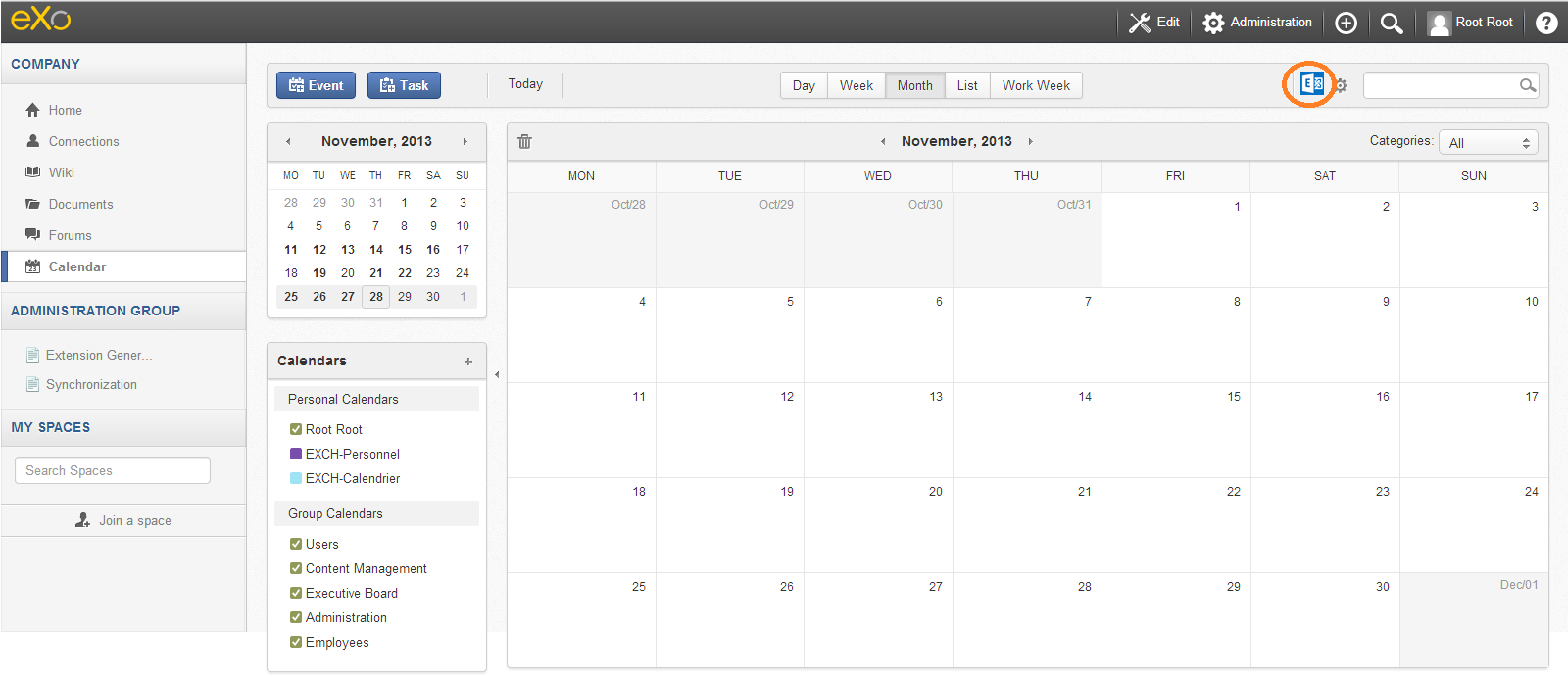
01-ExchangeButton

Click on the button then click on “Edit Settings” to setup your Microsoft Exchange Settings and credentials. Alternatively, an admin can set global settings that will apply for all users by configuration (See Installation Guide).
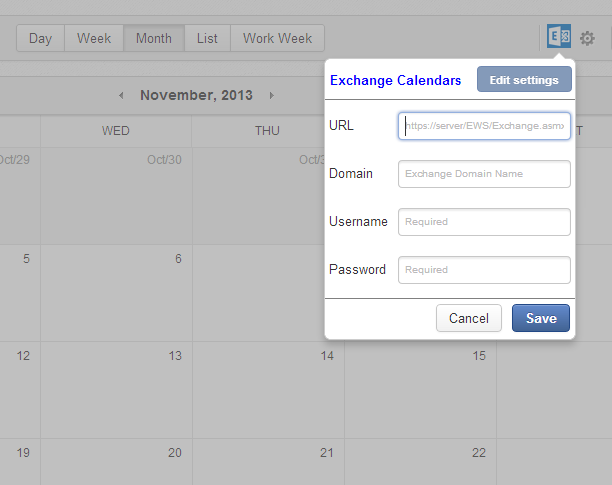
02-ExchangeServerSettings

Click save, and you will get the list of Microsoft Exchange Calendars. Choose which Calendar you want to synchronize with eXo.
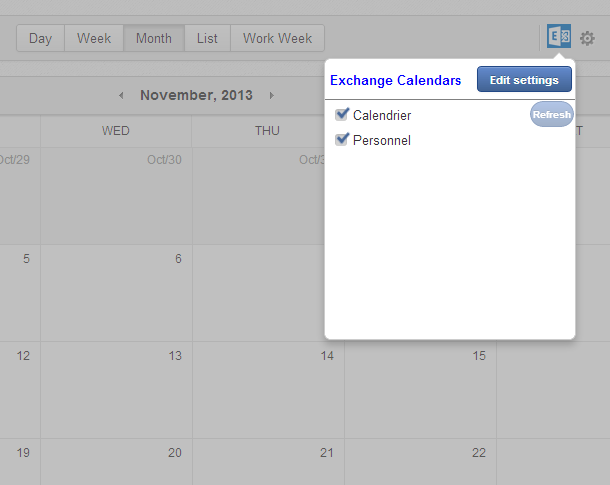
03-ExchangeCalendars

You have to wait a few seconds until synchronization is complete. In fact, the synchronization will be scheduled every 30 seconds by default (it can be changed by configuration), or manually by pushing the “Refresh” button.

After synchronization is complete, you can see your Exchange calendars and appointments imported in eXo. You can rename the calendars (this will not affect Exchange), and modify the appointments (pushed immediately to Exchange).
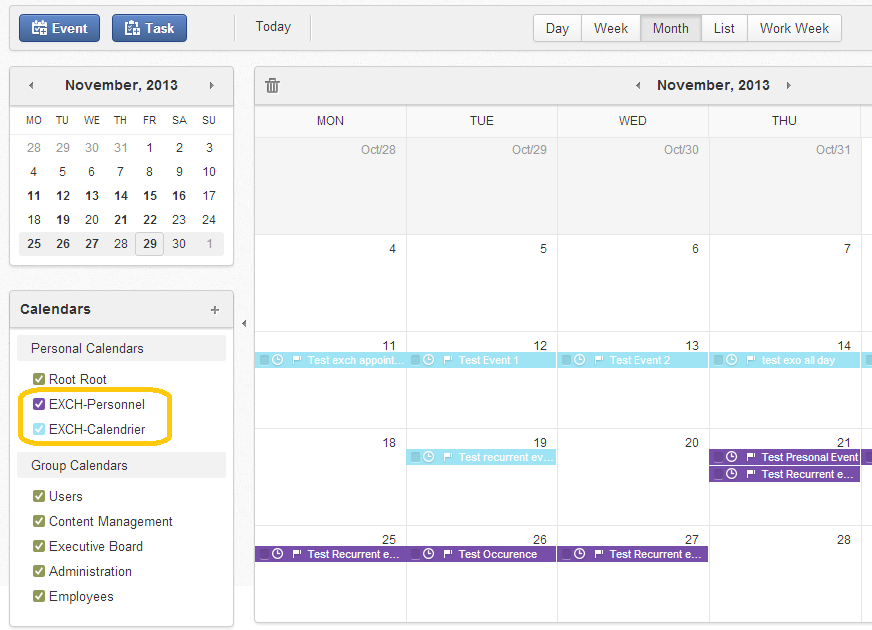
04-ExchangeSynhronizedCalendars

How does it work?

1/ The synchronization is bidirectional, so any modification, creation or deletion will be pushed to the other side. The modifications need a few seconds to be applied in the other application.

2/ All Kinds of events are synchronized, such as a recurrent event, an exceptional occurrence, an allDay event, etc.

3/ All fields are synchronized in both sides. For invitations and attendees this will only be valid if the email of the invited user exists in both servers.

4/ All appointments of an Exchange calendar except Exchange Tasks will be imported into eXo. These do not affect Exchange Calendars, so will not be imported, unlike eXo Calendar Tasks, which will be considered as Calendar Items and will be pushed to Exchange as an Appointment.

Learn more

Enjoy this new add-on! It’s available for free in the community:
– Download the Exchange Extension from the eXo Add-on center.
– Join the Exchange Extension space in the community and give us your comments.
– Ask questions in eXo Support Forums.

Brahim Jaouane

I am a Digital Marketing specialist specialized in SEO at eXo Platform. Passionate about new technologies and Digital Marketing. With 10 years' experience, I support companies in their digital communication strategies and implement the tools necessary for their success. My approach combines the use of different traffic acquisition levers and an optimization of the user experience to convert visitors into customers. After various digital experiences in communication agencies as well as in B2B company, I have a wide range of skills and I am able to manage the digital marketing strategy of small and medium-sized companies.

Full-featured digital workplace with everything your employees need to work efficiently, smartly integrated for a compelling employee experience

  • Product
    • Software tour
    • Internationalisation
    • Mobile
    • No Code
    • Architecture
    • Integrations
    • Security
    • Open Source
  • Uses cases
    • Employee Portal
    • Knowledge management
    • Entreprise Social Network
    • Employee Engagement
    • Community Management
    • Extranet
  • Guides
    • What is a digital workplace?
    • Intranet guide
    • What is an extranet?
    • Employee engagement
    • Collaboration guide
    • Teamwork guide
    • Internal Communication guide
  • Enterprise
    • Product offer
    • Services Offer
    • Customers
    • About us
  • Resources
    • FAQs
    • Resource Center
    • Intranet Portal
    • What Is a Collaboration Software?
    • Talent Management
    • Employee Connection
    • Employee Intranet
    • Improve internal communication
    • eXo Tribe
  • Terms and Conditions
  • Legal
  • Privacy Policy
  • Accessibility
  • Contact us
  • Sitemap
  • Facebook
  • Twitter
  • LinkedIn
wpDiscuz