Team Collaboration, Video Conferencing in eXo Chat and Why You Can Drop Skype Now
When we decided to redesign eXo Chat from scratch, we wanted to make it collaborative, just like we did with our social intranet. An enterprise social network is a nice tool for bringing interactions and socialization into your company’s intranet, but without collaborative tools at its core, will you be more efficient?
We think social networking and collaboration need to work together, providing new ways to interact. eXo Platform is all about that combination; it’s easy to use and intuitive but still very powerful.
eXo Chat is a new tool to bring real-time collaboration into your social network.
Today, we’re very happy to introduce some great new features in eXo Chat. We think that collaboration from within Chat will change how people interact and work together.
So, let’s take a look at these new features.
What’s new?
Here is a list of what’s available today:
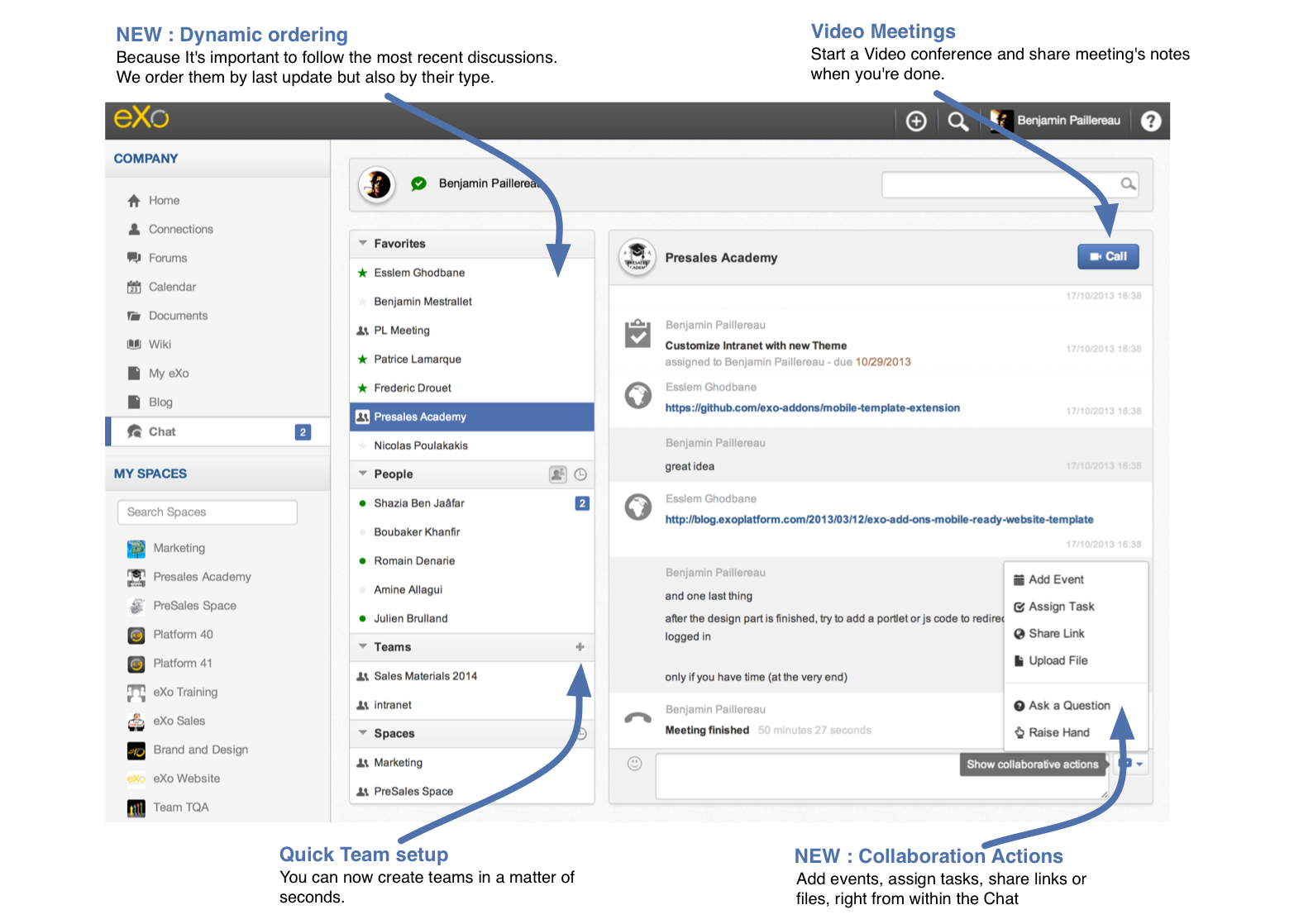
- Video conference with team meeting sessions.
- Add events, assign tasks, upload files, and share links or questions from within eXo Chat.
- Take advantage of dynamic ordering for people, teams, and spaces, which makes the tool more intuitive.
- Report meeting notes in the wiki.
If you don’t have ten minutes to spend reading this blog post or view the three-minute video presentation, just take a look at this screenshot :
So, why should I stop using Skype?
The idea of a chat, using any chat app out there, is real-time collaboration and discussion in a natural way. Adding web chat capabilities to your intranet won’t be any different than using Skype if the tools aren’t fully integrated.
Every enterprise social network product comes with a chat feature because it’s a “must have,” but everybody continues to use Skype. Why? Because Skype has the same features as the network tool, if not more, and they’re presented in a more user-friendly, intuitive way.
At eXo, we think collaboration in the chat may be a key element when it comes to get the work done, the same way the social feed can combine with a collaboration feed,
Sharing files in Skype makes me crazy!
Let’s take one simple example to show how collaborative intranet can help you to be more efficient.
You’re having a real-time discussion in Skype and you want to share a file. So, what do you do?
– You upload it to your intranet, then share it to all in the intranet, then copy/paste this link to the chat.
I don’t think so, or if you do, I think you don’t do it intuitively.
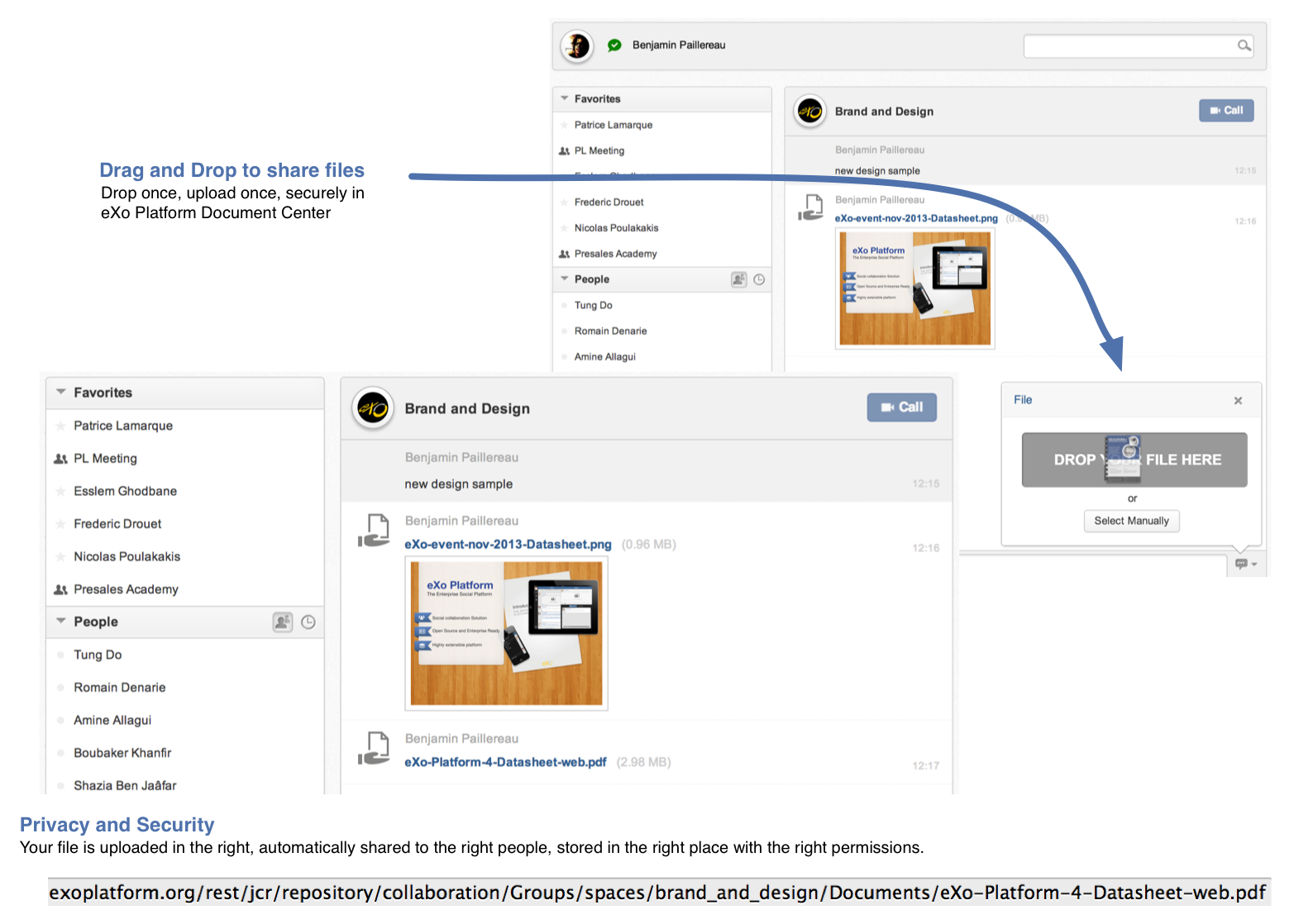
What people really do is drop the file from their Desktop directly in Skype, uploading to everyone… except those who are not online right now.
That’s pure nonsense !
1/ You’re uploading as many times as you have people connected; what a waste!
2/ You’re not getting the file to everyone who needs it. What about Mark, who is offline and will connect in an hour? He doesn’t get the file, so he’ll have to send you an email asking if you can send it to him. Again, what a waste!
What should happen is this: You’re chatting in a group discussion, and you simply drop a file in the Chat window. The file uploads to the eXo Platform Document Center, securely and privately. When Mark comes online, he’ll have access to the file, too. It’s more efficient in terms of both network resources and human time resources.
What problems can real-time collaboration solve?
The better way to work together is face to face; we all know that. You lose 80% of your communication behavior in text-only interactions. So, adding collaboration in chat only makes sense if it solves a problem. People won’t use it if it’s just for fun. It’s already hard to work as a team when you’re not in the same office; add to that additional complexity in interactions, and you have a failure.
A good example is meeting notes. It’s already difficult to manage with face-to-face meetings, but it becomes a nightmare when you’re online.
To solve this, we introduce a new feature that will leverage three different technologies working seamlessly together :
- Video conferencing allows you to trigger the beginning and the end of your meeting.
- Chat allows people in the meeting to take notes together, in a collaborative way. Thus, when it’s your turn to talk, someone continues to take notes.
- eXo collaboration tools allow you to add events, assign tasks, and share files during the meeting, all without leaving your discussion. Thus, you can focus on people and your work and not how to do this or that.
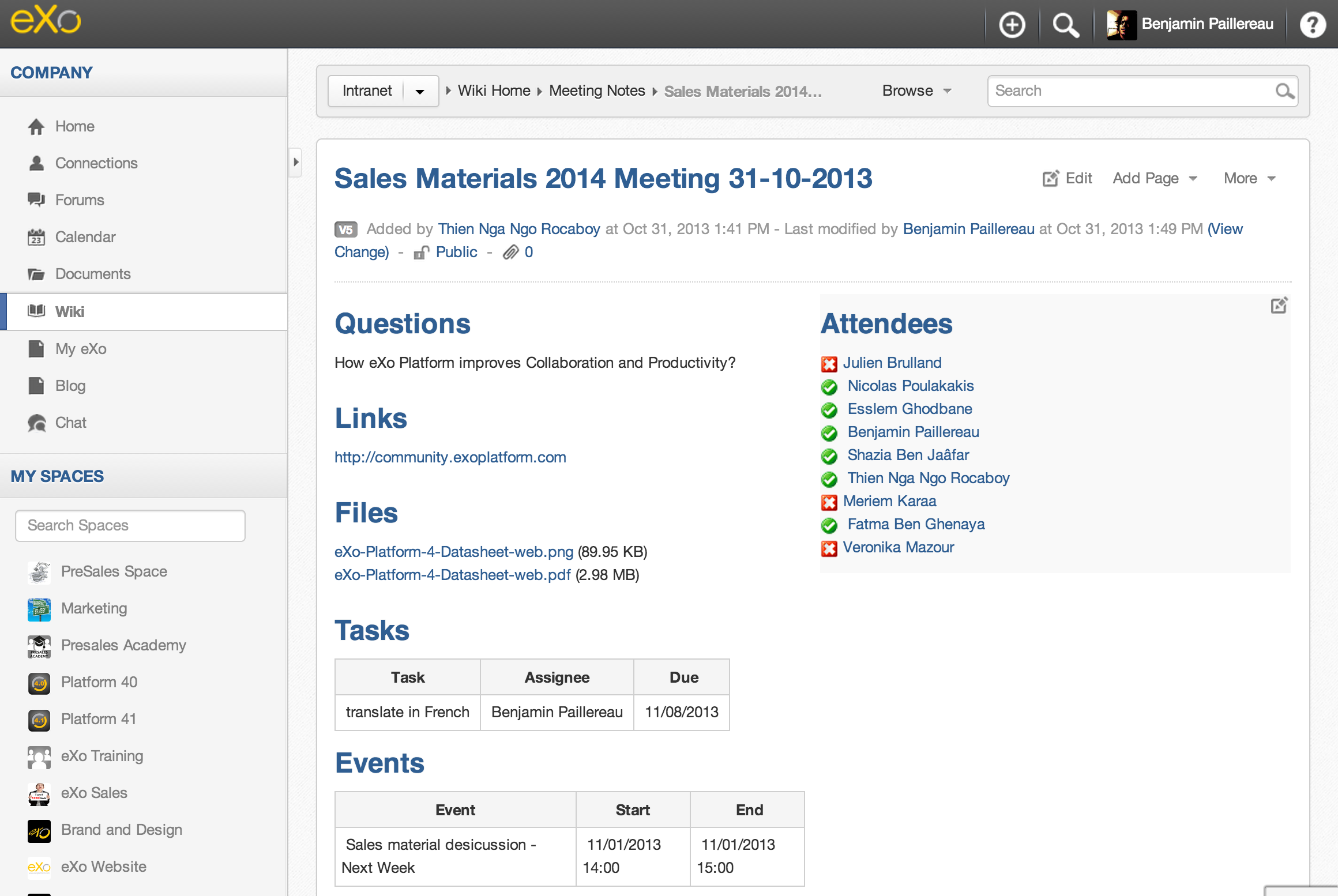
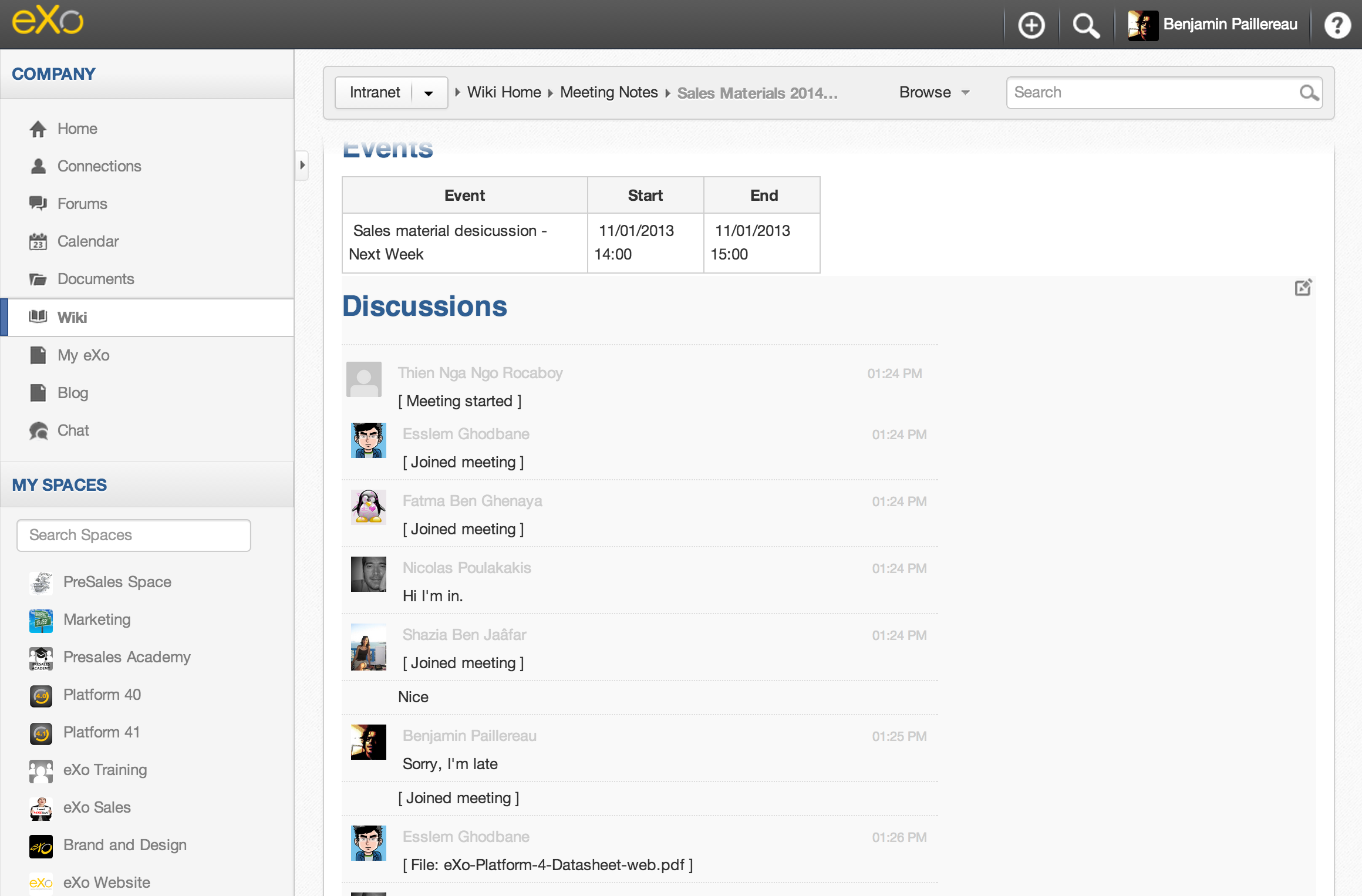
Best of all, you can generate meeting notes when you end your session. They’ll be stored in your Wiki Knowledge Center and shared to everyone in the space. Also, the system knows who was attending the meeting and who wasn’t there. It knows Mark was away, so it will send him a notification. He can see the notes and minutes in a nice report.
Here is the top of the meeting notes report, showing a summary of actions taken:
Below this summary, you will find the minutes from the beginning of the call to the end.
Do you want to see it in action?
We’re starting an early adopter program; participants will test these new features and help us improve them. If you’re interested, join us at our Community website—it’s free! There, you’ll have an opportunity to test Video Conferencing by Weemo as an early adopter.
You can also take a look at this three-minute video to see eXo Chat in action.
So, what do you think?
You played with it, and you already have feedback or ideas.
Join our community in eXo Chat add-on space. It’s the best place to discuss the new features, share ideas, and see what’s coming next.
eXo Chat is at its beginning; it’s still a baby, but it will provide more features in the coming months, such as:
- Manage Public Webinar
- WebRTC integration when available
- Quick answer from everywhere
Speaking of WebRTC, Weemo kindly invited us to join them for the conference in Santa Clara on November 19. Come meet us; the Weemo team; and our CEO, Benjamin Mestrallet, at the WebRTC3 Conference.
As we said at the beginning of this post, it’s a great challenge we’re taking on, and you can help us in this adventure.
“Thanks for watching and stay tuned—more things are coming, Benjamin.”
Brahim Jaouane

I am a Digital Marketing specialist specialized in SEO at eXo Platform. Passionate about new technologies and Digital Marketing. With 10 years' experience, I support companies in their digital communication strategies and implement the tools necessary for their success. My approach combines the use of different traffic acquisition levers and an optimization of the user experience to convert visitors into customers. After various digital experiences in communication agencies as well as in B2B company, I have a wide range of skills and I am able to manage the digital marketing strategy of small and medium-sized companies.