Try now Demo en
  • en
  • fr
  • de
  • Solutions
    • Use cases
      • Modern IntranetBuild strong internal culture & sense of belonging
      • Collaboration PlatformEfficient teamwork and project collaboration
      • Social NetworkEngage users & recognize contributions
      • Knowledge hubCentralize, organize and share company knowledge
      • Application PortalUnified access to business applications and information
    • Switch to eXo
      • Microsoft 365 AlternativeAn open-source digital workplace alternative to M365
      • Migrate to eXo PlatformA guided, secure migration path from your existing tools to eXo
  • Product
    • Overview
      • Platform overviewExplore core capabilities
      • Why eXoKey differentiators
      • InternationalisationMultilingual environments
      • MobileBranded mobile applications
    • Platform
      • No CodeTailor to your needs without code
      • IntegrationsConnectors & extension capabilities
      • Controlled AIGoverned, extensible AI
    • Technology
      • ArchitectureArchitecture & technology
      • SecuritySecurity measures
      • Open sourceComponents & licensing
  • Offers
    • EnterprisePrivate cloud or on-premise deployments
    • eXo HubsReady-to-use SaaS edition for teams
    • Compare EditionsCompare editions and choose the right fit
    • OEM EditionFor software vendors & service providers
    • ServicesDiscover eXo professional services
  • Resources
    • Resource center
      • Case studies
      • White Papers
      • Datasheets
      • Videos
    • FAQsAbout the software, the community and our offers
      • Platform & Use Cases
      • AI & Responsible AI
      • Deployment, Security & Compliance
      • Open-source, Pricing & Services
    • From The Blog
      • eXo Platform 7.1 is released
      • Digital sovereignty: when public organizations move from words to action
      • Cloud Vs On-premise Digital Workplace: Which one is right for your business?
  • Community
    • CommunityJoin our online community platform
    • DownloadLaunch eXo platform in your infrastructure
    • Source codeSource code on github
    • REST APIs & DocumentationAll REST APIs available in eXo Platform
  • Company
    • About us
    • Customers
    • Partners
    • Contact us
    • Newsroom
  • Menu mobile
    • Enterprise Offers
    • Blog
    • About us
    • Resource center
    • Careers
    • Contact us
    • Try eXo
Use cases
  • Modern Intranet Build strong internal culture & sense of belonging
  • Collaboration Platform Efficient teamwork and project collaboration
  • Social Network Engage users & recognize contributions
  • Knowledge hub Centralize, organize and share company knowledge
  • Application Portal Unified access to business applications and information
Switch to eXo
  • Microsoft 365 Alternative An open-source digital workplace alternative to M365
  • Migrate to eXo Platform A guided, secure migration path from your existing tools to eXo
Overview
  • Platform overview Explore core capabilities
  • Why eXo Key differentiators
  • Internationalisation Multilingual environments
  • Mobile Branded mobile applications
Platform
  • No Code Tailor to your needs without code
  • Integrations Connectors & extension capabilities
  • Controlled AI Governed, extensible AI
Technology
  • Architecture Architecture & technology
  • Security Security measures
  • Open source Components & licensing
Enterprise Private cloud or on-premise deployments
eXo Hubs Ready-to-use SaaS edition for teams
Compare Editions Compare editions and choose the right fit
OEM Edition For software vendors & service providers
Services Discover eXo professional services
Resource center
  • Case studies
  • White Papers
  • Datasheets
  • Videos
FAQs About the software, the community and our offers
  • Platform & Use Cases
  • AI & Responsible AI
  • Deployment, Security & Compliance
  • Open-source, Pricing & Services
From The Blog
  • eXo Platform 7.1 is released
  • Digital sovereignty: when public organizations move from words to action
  • Cloud Vs On-premise Digital Workplace: Which one is right for your business?
Community Join our online community platform
Download Launch eXo platform in your infrastructure
Source code Source code on github
REST APIs & Documentation All REST APIs available in eXo Platform
About us
Customers
Partners
Contact us
Newsroom
Enterprise Offers
Blog
About us
Resource center
Careers
Contact us
Try eXo
  1. Accueil
  2. News
  3. A Better Calling Experience with eXo Platform 4.3!

A Better Calling Experience with eXo Platform 4.3!

BD-2811_banners_650x220_1

We announced that Platform 4.3 would be more concerned with productivity, so video calls deserved our attention in terms of the experience at work.
Being productive means achieving more work and being efficient, which is our first concern for every new feature or improvement we make. Video calls have a bunch of benefits, allowing you to boost your productivity in face-to-face meetings.

We want to improve the effectiveness of our users’ experience by providing better quality and stability for voice and video calls.

Previously, video calls used a driver, but now they work through a browser plugin for Firefox and Internet Explorer. Users of Google Chrome will no longer need to install a browser plugin to make or receive video calls, thanks to our support for WebRTC standards.

WebRTC, késako?

As the name suggests, WebRTC (web real-time communication) is a technology that provides real-time communication capabilities, such as audio or video browser-to-browser.

For Google Chrome, this simply means that no plugin or specific action is required to make a voice or video call.

On Firefox or Internet Explorer, you will need to download and install a browser plugin, but don’t worry, we have made this easy and seamless. When you start a call, if the plugin has not yet been installed, a pop-up will give you all the details and suggest that you install it.
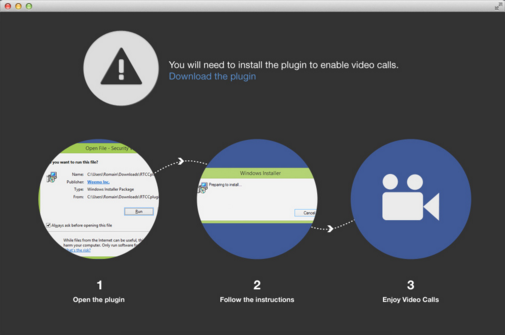
Video Calls

Did you say a pop-up?

In our previous version, voice and video calls were managed within the browser, preventing you from handling a call while browsing efficiently in eXo Platform.
We have reviewed and updated the experience, so you can place, receive and hold calls in a separate browser pop-up window to maximize your productivity.
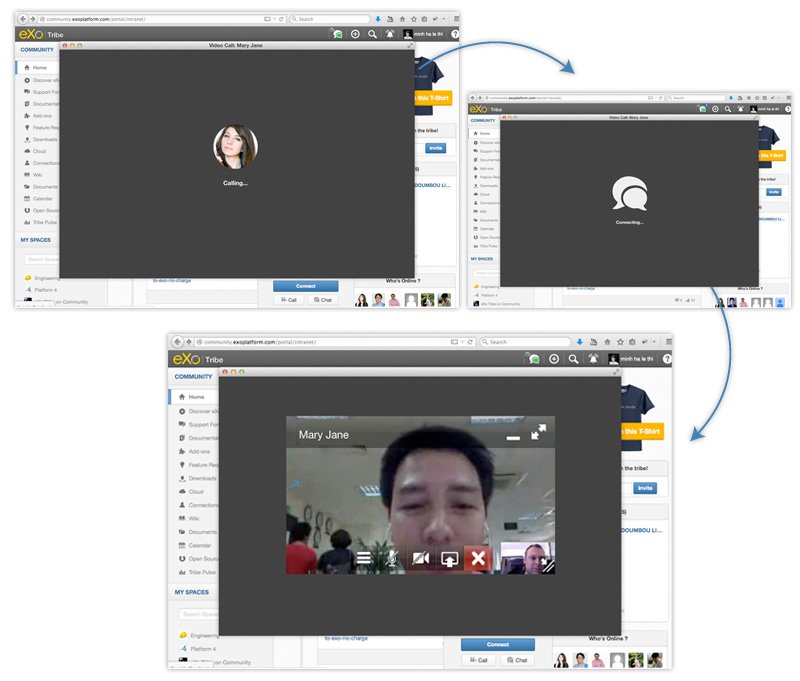
BD-1811_images2

Now, you will be notified of an incoming call on the right bottom corner. You are free to answer or decline it.
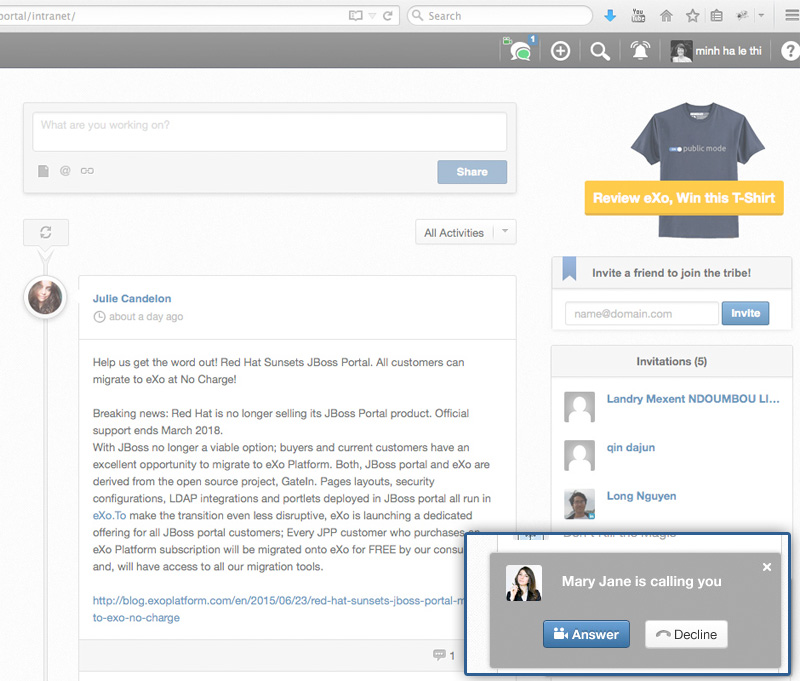
BD-1811_images


As usual, we need your feedback, so please try it out and let us know what you think!

Just download the latest preview build of Platform 4.3, then install the add-on with:
./addon install exo-video-calls::1.3.0-RC3-1 –unstable

Do you have any questions? Share them with us here!.

Marine Vacelet

Full-featured digital workplace with everything your employees need to work efficiently, smartly integrated for a compelling employee experience

  • Product
    • Software tour
    • Internationalisation
    • Mobile
    • No Code
    • Architecture
    • Integrations
    • Security
    • Open Source
  • Uses cases
    • Employee Portal
    • Knowledge management
    • Entreprise Social Network
    • Employee Engagement
    • Community Management
    • Extranet
  • Guides
    • What is a digital workplace?
    • Intranet guide
    • What is an extranet?
    • Employee engagement
    • Collaboration guide
    • Teamwork guide
    • Internal Communication guide
  • Enterprise
    • Product offer
    • Services Offer
    • Customers
    • About us
  • Resources
    • FAQs
    • Resource Center
    • Intranet Portal
    • What Is a Collaboration Software?
    • Talent Management
    • Employee Connection
    • Employee Intranet
    • Improve internal communication
    • eXo Tribe
  • Terms and Conditions
  • Legal
  • Privacy Policy
  • Accessibility
  • Contact us
  • Sitemap
  • Facebook
  • Twitter
  • LinkedIn
wpDiscuz