Developing a Simple Document Management eXo Add-on
In this tutorial I’ll show you the basics of developing a simple document management add-on for eXo Platform.
My app requirements are simple :
- Drag-n-Drop files directly from your desktop to the app drop zone;
- Upload the files in eXo JCR;
- View the size of each doc;
- Thumbnail generation for images;
- Link to download each file using WebDAV;
- Public link to share the file to others;
So, let’s see how we can do this little app using eXo Platform 3.5 for the portal and document side, Juzu to write the app and Bootstrap for the design.
I won’t detail how to develop on top of eXo Platform, you can find a lot of resources to help you on the eXo community website. And here for Juzu: http://juzuweb.org.
Just to say it, Juzu is fun to develop with and eXo Platform is full of features to achieve my goal. So, let’s get started!
From your desktop to the drop zone
Step 1: Drop zone in the portlet
I used this jQuery plug-in: FileDrop, for this. But you can use any client plugin, it doesn’t matter.
So, we have something like this in the client:
<div id="dropbox">
    <span class="message">Drop files here to upload. <br /><i>(they will only be visible to you)</i></span>
 </div>
Here for the full index.gtmpl code.
Step 2: jQuery module
$(function(){

	var dropbox = $('#dropbox'),
		message = $('.message', dropbox);

	dropbox.filedrop({
		// The name of the $_FILES entry:
		paramname:'pic',

		maxfiles: 20,
		maxfilesize: 2,
		url: '/documents/uploadServlet',
		...
Here for the full main.js code.
Now, we need to store the files.
Upload files in eXo JCR
We can use a basic servlet to do this. I could use Servlet 3.0 @WebServlet annotation, but since my eXo bundle runs on Tomcat 6, I’m still stuck with Servlet 2.5. So, I use the “legacy” way:
protected void doPost(HttpServletRequest request, HttpServletResponse response) throws ServletException, IOException
  {
    try
    {
      List items = new ServletFileUpload(new DiskFileItemFactory()).parseRequest(request);
      for (FileItem item : items)
      {
        if (item.getFieldName().equals("pic"))
        {
          storeFile(item, request.getRemoteUser());

          response.setContentType("application/json");
          response.setCharacterEncoding("UTF-8");
          response.getWriter().write("{\"status\":\"File was uploaded successfuly!\"}");
          return;
        }
      }
    }
    catch (FileUploadException e)
    {
      throw new ServletException("Parsing file upload failed.", e);
    }
  }
Here for the full UploadServlet.java code.
Crystal clear, isn’t it?
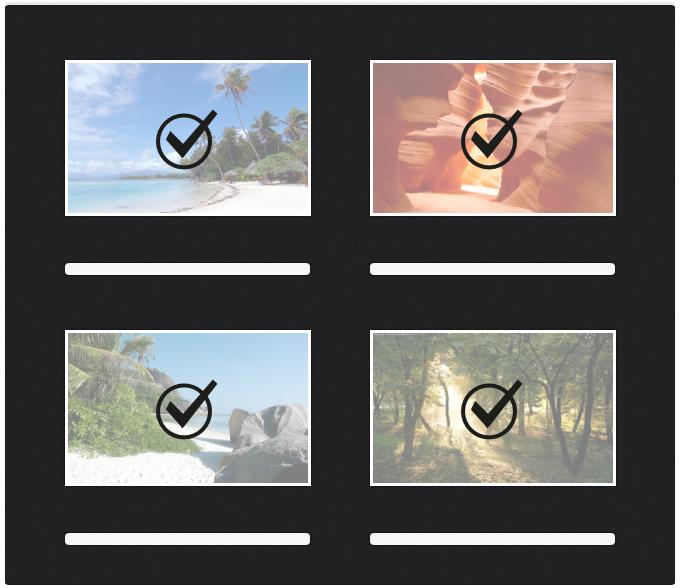
The interface looks like this when you drop multiple files:
View the size of each doc
Step 1: getting the size
Getting the size with a readable format is not a so easy task, we first need to get the size of the file:
if (node.hasNode("jcr:content")) {
            Node contentNode = node.getNode("jcr:content");
            if (contentNode.hasProperty("jcr:data")) {
              double size = contentNode.getProperty("jcr:data").getLength();
              String fileSize = calculateFileSize(size);
              file.setSize(fileSize);
            }
          }
Step 2: formatting the size
Then, make it “human-readable”:
  public static String calculateFileSize(double fileLengthLong) {
    int fileLengthDigitCount = Double.toString(fileLengthLong).length();
    double fileSizeKB = 0.0;
    String howBig = "";
    if (fileLengthDigitCount < 5) {
      fileSizeKB = Math.abs(fileLengthLong);
      howBig = "Byte(s)";
    } else if (fileLengthDigitCount >= 5 && fileLengthDigitCount <= 6) {
      fileSizeKB = Math.abs((fileLengthLong / 1024));
      howBig = "KB";
    } else if (fileLengthDigitCount >= 7 && fileLengthDigitCount <= 9) {
      fileSizeKB = Math.abs(fileLengthLong / (1024 * 1024));
      howBig = "MB";
    } else if (fileLengthDigitCount > 9) {
      fileSizeKB = Math.abs((fileLengthLong / (1024 * 1024 * 1024)));
      howBig = "GB";
    }
    String finalResult = roundTwoDecimals(fileSizeKB);
    return finalResult + " " + howBig;
  }
Here for the full DocumentsData.java code.
If you think of a better way to do this, I’m very interested.
Thumbnail generation
This one is really easy, we just have to consume one of the REST services provided by eXo Platform.
We have a great service to resize and crop images to your needs, the call is like this:
/rest/thumbnailImage/custom/<WIDTH>x<HEIGHT>/repository/collaboration/<PATH-TO-DOC>
Setting WIDTH and HEIGHT will crop the image automatically, Otherwise, setting one or the other to « 0″ will just resize the image accordingly to the other parameter set.
Here for the full File.java code.
Download using WebDAV
Downloading files using WebDAV is as easy as the thumbnail stuff, we just need to call the right REST service.
/rest/jcr/repository/collaboration/<PATH-TO-DOC>
Here for the full File.java code.
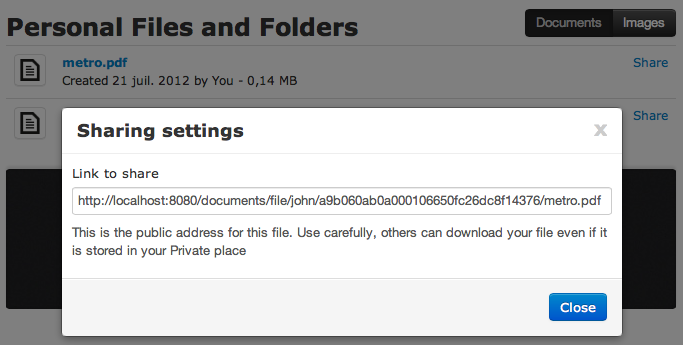
Share with others
Sharing files with others is a little more tricky as we have to generate the URL. I will do it the simplest way (no strong security, no password protection).
Using the JCR UUID of each node, we can have a really unique file to share which is also hard to guess. I think it’s fine enough for a simple app.
So, I want a simple URL format, like this:
/documents/file/<USERNAME>/<UUID>/<FILE-NAME>.<FILE-EXTENSION>
Step 1: generate a unique URL
I generate the URL directly in the Document Service:
          String url = baseURI+"/documents/file/"+Util.getPortalRequestContext().getRemoteUser()+"/"+file.getUuid()+"/"+file.getName();
          file.setPublicUrl(url);
Here for the full DocumentsData.java code.
Step 2: Sharing servlet
Like the upload on the server side, we can write a small servlet on the server side to get the file:
  protected void doGet(HttpServletRequest request, HttpServletResponse response) throws ServletException, IOException
  {
    String[] params = request.getRequestURI().split("/");
    try
    {
      if (params.length==6)
      {
        String uuid = params[4];

        Node node = getFile(uuid);
        response.setContentType(getMimeType(node));
        response.setCharacterEncoding("UTF-8");
        response.setStatus(HttpServletResponse.SC_OK);
        InputStream in = getStream(node);
        OutputStream out = response.getOutputStream();

        byte[] buffer = new byte[1024];
        int len = in.read(buffer);
        while (len != -1) {
          out.write(buffer, 0, len);
          len = in.read(buffer);
        }

      }
    }
    catch (Exception e)
    {
      response.setStatus(HttpServletResponse.SC_NOT_FOUND);
    }
    return;
  }
Here for the full DownloadServlet.java code.
Let’s get a quick look on the UI for this one:
Additional features
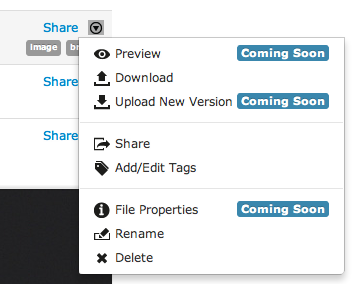
In addition to the features developed above, you can:
- Rename a file;
- Delete a file;
- Add / Edit tags;
- Create sub-directories;
- Open office documents;
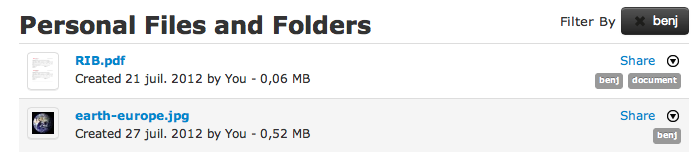
And best of all, you can now filter your docs by tags:
Conclusion
I did one other cool thing I wanted to keep for the end: I removed the Folder organization.
All the documents are stored inside the Users’s Private storage in eXo Platform; more precisely in the and folders depending on the file types. Thus, I used the standard storage and each user can find all his documents in the native Documents application available in eXo Platform but they find it more using filters in the Document app.
Here, I wanted to provide an alternative application with less features but I hope, more easy to use for end users.
The app is finished for now and here is the result:
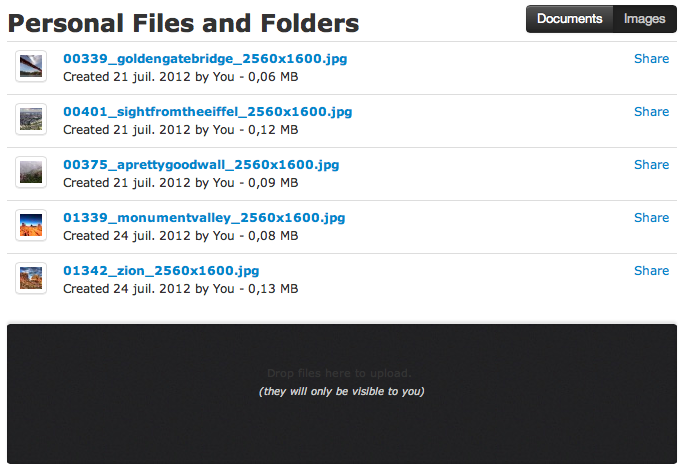
You can find the portlet source code on the eXo Add-on GitHub: https://github.com/exo-addons/documents-application
Brahim Jaouane

I am a Digital Marketing specialist specialized in SEO at eXo Platform. Passionate about new technologies and Digital Marketing. With 10 years' experience, I support companies in their digital communication strategies and implement the tools necessary for their success. My approach combines the use of different traffic acquisition levers and an optimization of the user experience to convert visitors into customers. After various digital experiences in communication agencies as well as in B2B company, I have a wide range of skills and I am able to manage the digital marketing strategy of small and medium-sized companies.