Try now Demo en
  • en
  • fr
  • de
  • Solutions
    • Use cases
      • Modern IntranetBuild strong internal culture & sense of belonging
      • Collaboration PlatformEfficient teamwork and project collaboration
      • Social NetworkEngage users & recognize contributions
      • Knowledge hubCentralize, organize and share company knowledge
      • Application PortalUnified access to business applications and information
    • Switch to eXo
      • Microsoft 365 AlternativeAn open-source digital workplace alternative to M365
      • Migrate to eXo PlatformA guided, secure migration path from your existing tools to eXo
  • Product
    • Overview
      • Platform overviewExplore core capabilities
      • Why eXoKey differentiators
      • InternationalisationMultilingual environments
      • MobileBranded mobile applications
    • Platform
      • No CodeTailor to your needs without code
      • IntegrationsConnectors & extension capabilities
      • Controlled AIGoverned, extensible AI
    • Technology
      • ArchitectureArchitecture & technology
      • SecuritySecurity measures
      • Open sourceComponents & licensing
  • Offers
    • EnterprisePrivate cloud or on-premise deployments
    • eXo HubsReady-to-use SaaS edition for teams
    • Compare EditionsCompare editions and choose the right fit
    • OEM EditionFor software vendors & service providers
    • ServicesDiscover eXo professional services
  • Resources
    • Resource center
      • Case studies
      • White Papers
      • Datasheets
      • Videos
    • FAQsAbout the software, the community and our offers
      • Platform & Use Cases
      • AI & Responsible AI
      • Deployment, Security & Compliance
      • Open-source, Pricing & Services
    • From The Blog
      • eXo Platform 7.1 is released
      • Digital sovereignty: when public organizations move from words to action
      • Cloud Vs On-premise Digital Workplace: Which one is right for your business?
  • Community
    • CommunityJoin our online community platform
    • DownloadLaunch eXo platform in your infrastructure
    • Source codeSource code on github
    • REST APIs & DocumentationAll REST APIs available in eXo Platform
  • Company
    • About us
    • Customers
    • Partners
    • Contact us
    • Newsroom
  • Menu mobile
    • Enterprise Offers
    • Blog
    • About us
    • Resource center
    • Careers
    • Contact us
    • Try eXo
Use cases
  • Modern Intranet Build strong internal culture & sense of belonging
  • Collaboration Platform Efficient teamwork and project collaboration
  • Social Network Engage users & recognize contributions
  • Knowledge hub Centralize, organize and share company knowledge
  • Application Portal Unified access to business applications and information
Switch to eXo
  • Microsoft 365 Alternative An open-source digital workplace alternative to M365
  • Migrate to eXo Platform A guided, secure migration path from your existing tools to eXo
Overview
  • Platform overview Explore core capabilities
  • Why eXo Key differentiators
  • Internationalisation Multilingual environments
  • Mobile Branded mobile applications
Platform
  • No Code Tailor to your needs without code
  • Integrations Connectors & extension capabilities
  • Controlled AI Governed, extensible AI
Technology
  • Architecture Architecture & technology
  • Security Security measures
  • Open source Components & licensing
Enterprise Private cloud or on-premise deployments
eXo Hubs Ready-to-use SaaS edition for teams
Compare Editions Compare editions and choose the right fit
OEM Edition For software vendors & service providers
Services Discover eXo professional services
Resource center
  • Case studies
  • White Papers
  • Datasheets
  • Videos
FAQs About the software, the community and our offers
  • Platform & Use Cases
  • AI & Responsible AI
  • Deployment, Security & Compliance
  • Open-source, Pricing & Services
From The Blog
  • eXo Platform 7.1 is released
  • Digital sovereignty: when public organizations move from words to action
  • Cloud Vs On-premise Digital Workplace: Which one is right for your business?
Community Join our online community platform
Download Launch eXo platform in your infrastructure
Source code Source code on github
REST APIs & Documentation All REST APIs available in eXo Platform
About us
Customers
Partners
Contact us
Newsroom
Enterprise Offers
Blog
About us
Resource center
Careers
Contact us
Try eXo
  1. Accueil
  2. Uncategorized
  3. eXo Platform 4 Highlights: Files Management

eXo Platform 4 Highlights: Files Management

Platform 4 is finally there. We prepared a few articles so you can discover what’s in the best version we ever released. Today’s one is about Files and Documents Management, one of oldest and core features of our platform.

Simple Design

Of course, as part of the great effort made on eXo Platform 4 in its overall Design, the Files application benefits from this global renewal.
But not only does it take the new Design, it also comes with a simplified view so you can focus on your work and your files. All the complex features are hidden for standard users so they’re not lost in the complexity of Files Management.
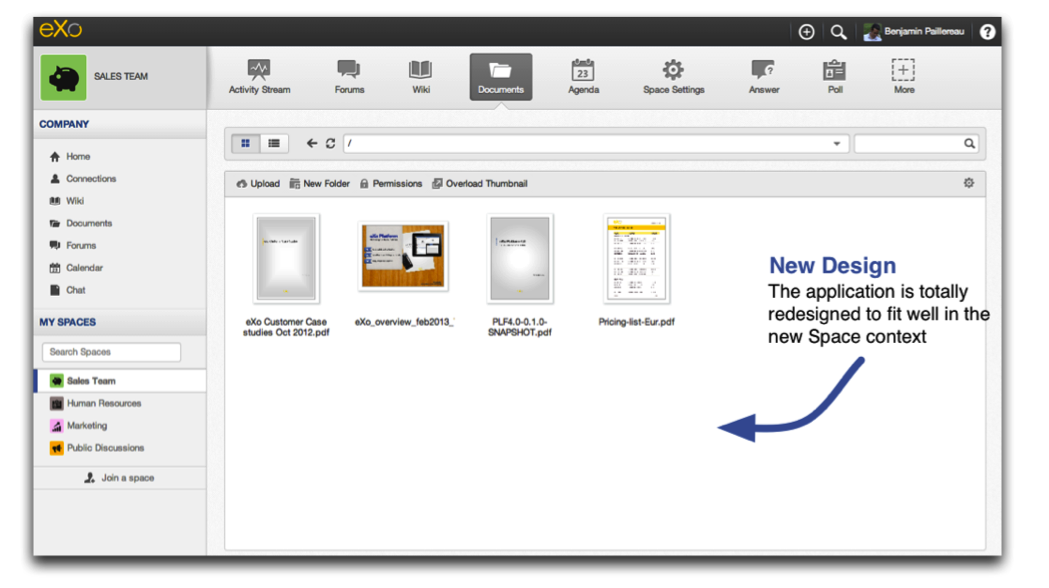
simple-design-1

Thanks to the new Contextual Navigation, you always know if you’re inside a space or inside your personal storage. As it would be redundant to repeat this context in the Documents app itself, we have also revamped it so it fits perfectly everywhere you need it.

Upload in Progress Bar

For those who come from eXo Platform 3.5 or older, this will be a huge change. The Upload has been totally rewritten. Now, you can upload a file, upload another and upload again. If the previous upload is not finished, it will be added to the In Progress list.
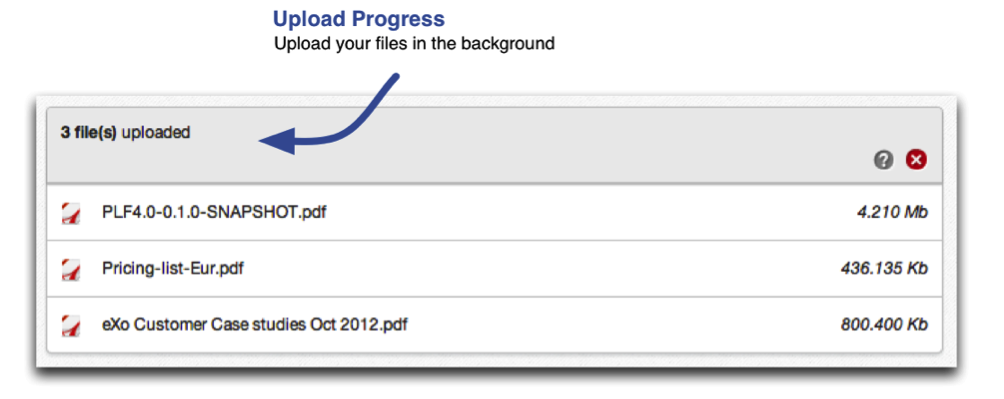
Upload-in-Progress-Bar

Multi Upload (finally!)

Yes, finally, it’s here. This may be one the Most Wanted features. Until eXo Platform 4, the only way to do mass uploading was to use the WebDAV connector. That’s now history!
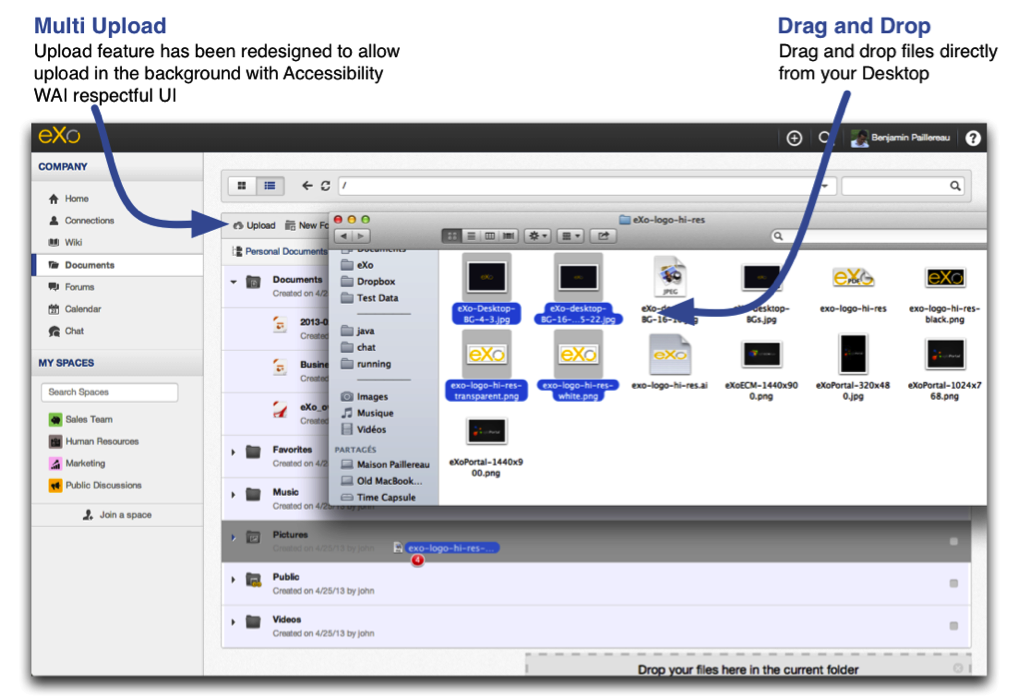
Multi-Upload

We decided to support the Multi Upload by file selection and “Drag and Drop” (DnD). In the first case, you click on the Upload button, you select multiple files on your file system and we post the files using a multipart form. The second way is by dragging files from Desktop Explorer onto your browser. It’s elegant but not Accessible (WAI Accessibility), thus a standard Upload button is always there for those who prefer it, can’t use DnD or simply don’t want it.

Files View

It’s only with you and by you that we improve the product. We have learnt a lot from our clients and partners in the past few years. Though eXo this year celebrates its 10th anniversary, we won’t stand still. We will continue to listen to your feedback and improve the product accordingly.
We hope the new Files view will answer most of your feedback on Files Management versus Document Management views.
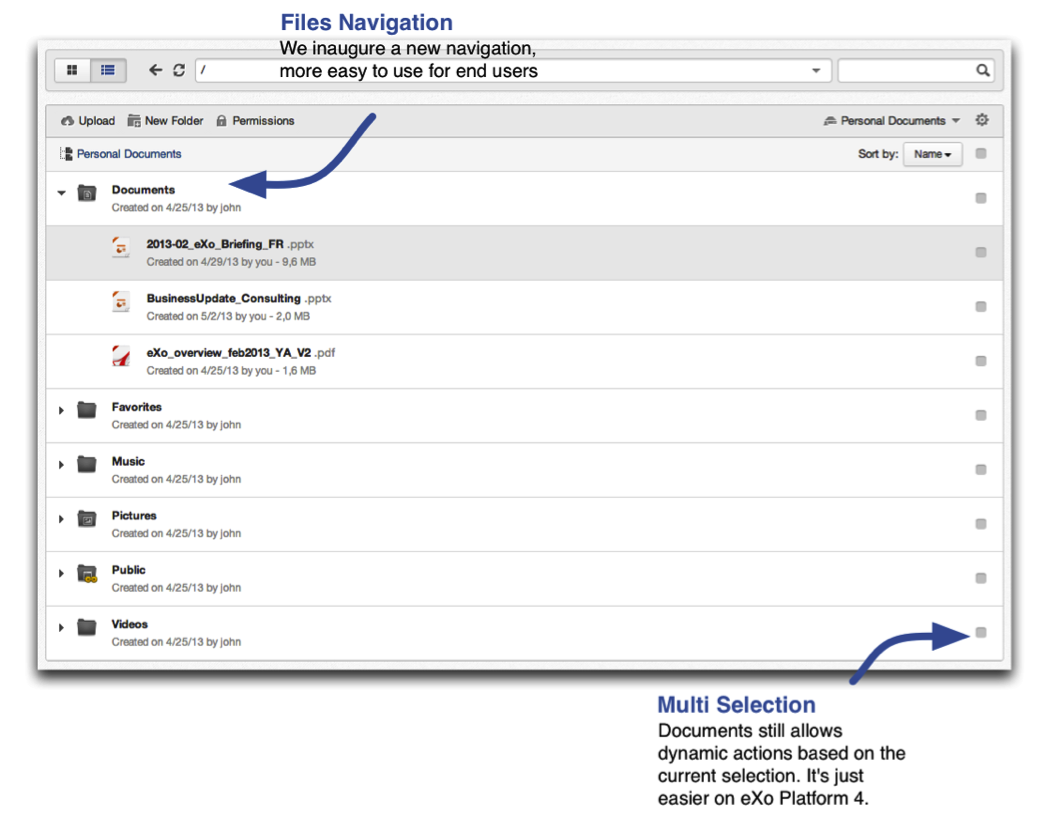
Files-View

From the very beginning of eXo we have had a Document Management System so you can contribute and publish articles, news, blog posts or any type of documents you may create in the platform.
While this is still there in eXo Platform 4, we have introduced a view that will ease Files Management. You can, for example, see the file’s size or its extension directly in the list. Small things but useful ones we hope.

Unified Search

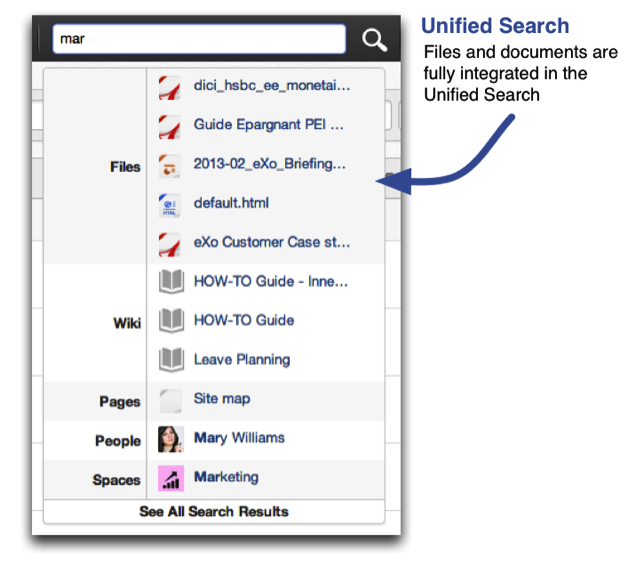
Thanks to our Lucene integration as search engine in the JCR, all files are fully analysed and indexed (Microsoft Office documents, Libre Office, pdf). Using the full text search, we will now have access to all your files at a glance, everything filtered based on your permissions.
Unified-Search

Quick Rename

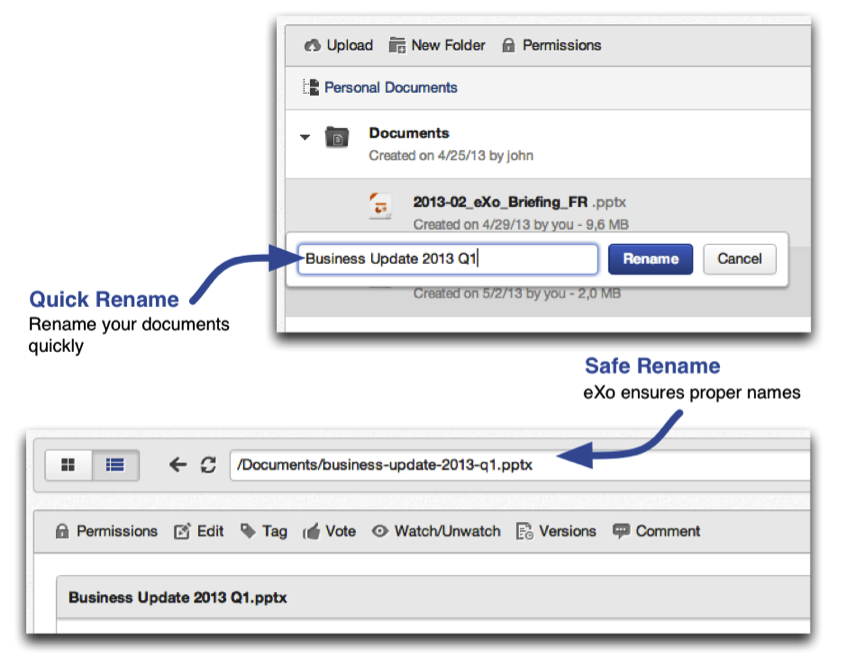
Another improvement on usability is the Rename box. You don’t have to enter a Title and a Name on your file anymore. You just give it a Title/Name and we take care of the rest.
Quick-Rename

We will create a “web-friendly” name so you can share files more easily.

File and Document Management

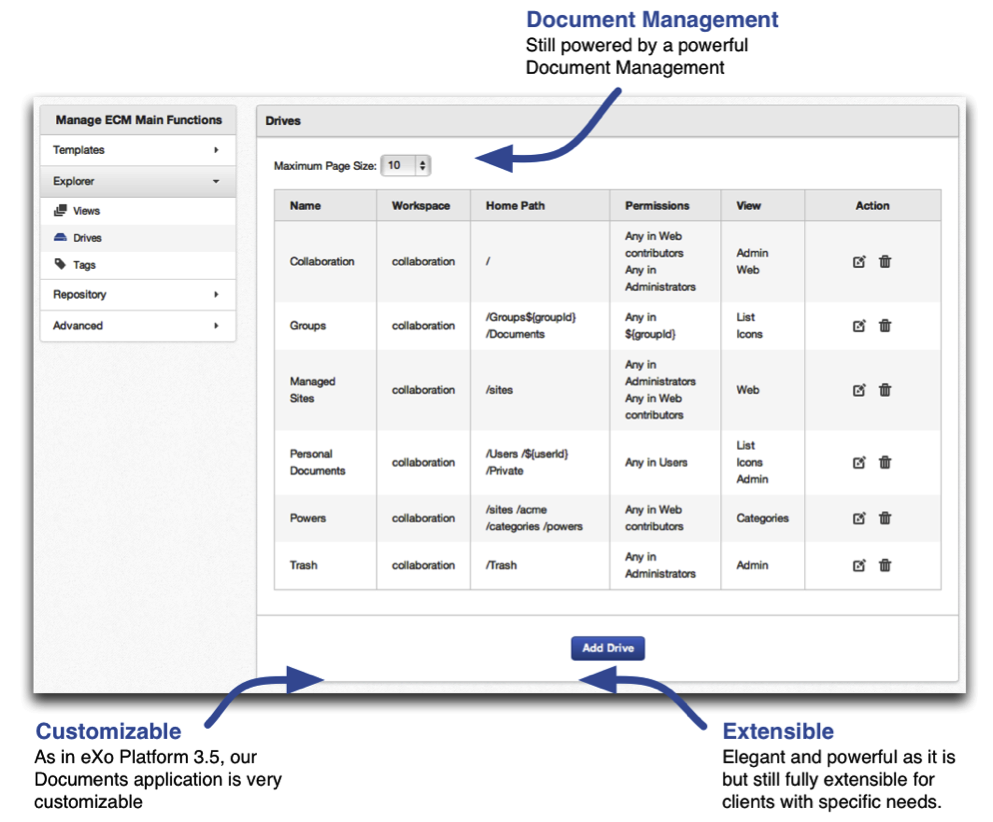
Finally, Files management couldn’t be part of eXo Platform if it is not customisable or extensible. We provide a Ready to Use platform and Ready to be customized as well.
With Platform 4, partners and advanced DMS users will be happy to find advanced features in the management tool. You can manage custom templates, views, drives, locks, queries. If you’ve no idea what I’m talking about, then discover more features for yourself in our Documentation website.
File-and-Document-Management

On eXo Platform 4, we chose features that will ease your work and give you back control of your Intranet. We’re always looking for ways to improve the User Experience, we can’t wait to have your feedback on this new release.

Stay tuned next week: we will highlight a long-awaited and totally new feature in eXo Platform 4. Do you have an idea already of what it will be about?

Brahim Jaouane

I am a Digital Marketing specialist specialized in SEO at eXo Platform. Passionate about new technologies and Digital Marketing. With 10 years' experience, I support companies in their digital communication strategies and implement the tools necessary for their success. My approach combines the use of different traffic acquisition levers and an optimization of the user experience to convert visitors into customers. After various digital experiences in communication agencies as well as in B2B company, I have a wide range of skills and I am able to manage the digital marketing strategy of small and medium-sized companies.

Full-featured digital workplace with everything your employees need to work efficiently, smartly integrated for a compelling employee experience

  • Product
    • Software tour
    • Internationalisation
    • Mobile
    • No Code
    • Architecture
    • Integrations
    • Security
    • Open Source
  • Uses cases
    • Employee Portal
    • Knowledge management
    • Entreprise Social Network
    • Employee Engagement
    • Community Management
    • Extranet
  • Guides
    • What is a digital workplace?
    • Intranet guide
    • What is an extranet?
    • Employee engagement
    • Collaboration guide
    • Teamwork guide
    • Internal Communication guide
  • Enterprise
    • Product offer
    • Services Offer
    • Customers
    • About us
  • Resources
    • FAQs
    • Resource Center
    • Intranet Portal
    • What Is a Collaboration Software?
    • Talent Management
    • Employee Connection
    • Employee Intranet
    • Improve internal communication
    • eXo Tribe
  • Terms and Conditions
  • Legal
  • Privacy Policy
  • Accessibility
  • Contact us
  • Sitemap
  • Facebook
  • Twitter
  • LinkedIn
wpDiscuz